KKMCPのベータ版を公開しました。
はじめに
前回作成しているといったKKMCPのベータ版を公開しました。
ダウンロードは以下からできます。
- KK版
- KKS版
できること
前回のブログで話した通りですが、AIにコイカツの操作をしてもらえます。
キャラメイクとスタジオ双方対応しています。
利用可能なツールについては別途説明します。
使い方
ダウンロードした次の2ファイルを、両方とも<ゲーム>/BepInEx/plugins/に配置します。
KK_KKMCP.dllNewtonsoft.Json.dll(KKMCP 同梱用)
Newtonsoft.Json.dllがない場合pluginの読み込みに失敗します。
詳しい動作環境は配布ページを見てください。
ゲームを起動すると、同時に127.0.0.1:8765にhttpサーバーが起動します。
AIエージェントのコネクタに名前にKKMCP、URLの項目に127.0.0.1:8765を入力して疎通確認をしてください。
接続できていれば導入完了です。
Skills
定型作業を自動化・効率化するために幾つかのSkillsを公開します。
add-tool 新規MCPツール追加
AIに操作可能なツールを作らせます。
SKILL.md を表示
---
name: add-tool
description: KKMCP に新しい MCP ツール (ITool) を追加する。実装ファイル生成・KKMCP.Core.projitems への登録・KKMCPPlugin.Awake() への RegisterTool 呼び出し追加・E2E テストスタブ生成を一括実行。4 箇所登録漏れを防ぐ。引数: `/add-tool <ToolName> <category>` (例: `/add-tool MakerGetMole maker`, `/add-tool StudioSetFog studio-extension:Fog`)
---

# add-tool — 新規 MCP ツールのスキャフォールド

KKMCP のツール追加には**最低 4 箇所の編集**が必要で、1つでも漏れるとビルドは通るのに実体が無い/コンパイル対象外/regression 検知できないといった事故が起きる。このスキルはそれを 1 コマンドにまとめる。

| # | 場所 | 漏れたとき何が起きるか |
|---|---|---|
| 1 | `src/KKMCP.Core/Mcp/Tools/.../<ToolName>Tool.cs` | 実体が無い |
| 2 | `KKMCP.Core.projitems` の `<Compile Include>` | コンパイル対象外でビルドは通るのに動かない |
| 3 | `KKMCPPlugin.Awake()` の `RegisterTool` / `TryRegisterExtension` | サーバー起動時に登録されず `tools/list` から欠落 |
| 4 | `tests/e2e/tools/<tool_name>.ps1` | regression 検知 (`/e2e-test`) でカバーされない |

## 引数

```
/add-tool <ToolName> <category>
```

- **ToolName**: PascalCase。`Tool` サフィックスは付けない (例: `MakerGetMole`)。MCP 上の名前は自動で snake_case に変換される (`maker_get_mole`)。
- **category**:
  | category | 配置先 | 名前空間 | 登録方法 |
  |---|---|---|---|
  | `general` | `Mcp/Tools/` | `KKMCP.Mcp.Tools` | `_mcp.RegisterTool(new ...)` |
  | `studio` | `Mcp/Tools/Studio/` | `KKMCP.Mcp.Tools.Studio` | `_mcp.RegisterTool(new ...)` |
  | `maker` | `Mcp/Tools/Maker/` | `KKMCP.Mcp.Tools.Maker` | `_mcp.RegisterTool(new ...)` |
  | `studio-extension:<ModName>` | `Mcp/Tools/Studio/Extensions/<ModName>/` | `KKMCP.Mcp.Tools.Studio.Extensions.<ModName>` | `TryRegisterExtension(() => new ...)` |

## 手順

### 1. 引数を解釈

- `ToolName` を snake_case に変換 (例: `MakerGetMole` → `maker_get_mole`)。これが MCP `Name` プロパティの値になる。
- category が `studio-extension:` プレフィクスならコロンの後を `<ModName>` として抽出。

### 2. ファイル配置先を決定

- `general`: `src/KKMCP.Core/Mcp/Tools/<ToolName>Tool.cs`
- `studio`: `src/KKMCP.Core/Mcp/Tools/Studio/<ToolName>Tool.cs`
- `maker`: `src/KKMCP.Core/Mcp/Tools/Maker/<ToolName>Tool.cs`
- `studio-extension:<ModName>`: `src/KKMCP.Core/Mcp/Tools/Studio/Extensions/<ModName>/<ToolName>Tool.cs`
  - `<ModName>/` ディレクトリが無ければ作成。

projitems の `Include` パスはバックスラッシュ区切り (`Mcp\Tools\Maker\<ToolName>Tool.cs`)。

### 3. 既存衝突を確認

新規実装前に以下を確認し、いずれかに該当したら**中断してユーザーに確認**:
- 同名ファイルが既に存在する
- `KKMCP.Core.projitems` に同名の `<Compile Include>` がある
- `KKMCPPlugin.cs` の Awake に同名 RegisterTool 行がある

### 4. ファイルを生成 (テンプレートは末尾参照)

category に応じたテンプレートで `<ToolName>Tool.cs` を Write する。

### 5. `KKMCP.Core.projitems` に登録を追加

該当カテゴリの既存 `<Compile Include>` ブロックの末尾に追加する。Edit ツールで該当カテゴリの最後の行を `old_string` として、その後ろに新行を加えた `new_string` で置換。

例 (maker):
```xml
    <Compile Include="$(MSBuildThisFileDirectory)Mcp\Tools\Maker\MakerSetCoordinateTypeTool.cs" />
    <Compile Include="$(MSBuildThisFileDirectory)Mcp\Tools\Maker\<ToolName>Tool.cs" />
```

### 6. `KKMCPPlugin.cs` の Awake に登録呼び出しを追加

- `general` / `studio` / `maker`: 該当カテゴリの最後の RegisterTool 行の直後に
  ```csharp
              _mcp.RegisterTool(new <ToolName>Tool());
  ```
  を挿入。
- `studio-extension:<ModName>`:
  ```csharp
              TryRegisterExtension(() => new <ToolName>Tool());
  ```
  を該当 Mod のブロック末尾 (Timeline なら Timeline 系の最後) に挿入。
  さらに `KKMCPPlugin.cs` の using 行に
  ```csharp
  using KKMCP.Mcp.Tools.Studio.Extensions.<ModName>;
  ```
  が無ければ追加 (NodesConstraints 等の既存 using の近くに置く)。

### 7. E2E テストスタブを生成

`tests/e2e/tools/<tool_name>.ps1` を Write する。同名ファイルが既にあれば**作成しない** (上書きしない)。テンプレートは末尾「テストスタブテンプレート」参照。

中身は最小チェック (`tools/call` がエラー無く返る) のみ。Maker / Studio 状態を要求するツールについては、テストファイル冒頭のコメントで運用方針を案内する。

### 8. ユーザーへの最終レポート

以下を報告:
- 編集した 4 ファイル (`.cs` / `projitems` / `KKMCPPlugin.cs` / `tests/e2e/tools/*.ps1`)
- ツール内テンプレートに残した `// TODO:` のリスト (実装すべき箇所)
- 次のアクション 3 点:
  1. ツールの実装 (テンプレートの `TODO` を埋める)
  2. `MODELS.md` にエントリを追加 (引数スキーマ・戻り値仕様)
  3. `/e2e-test -Filter tools/<tool_name>` で生成スタブが通ることを確認 (あるいは状態依存なら適切に skip 化)

## テンプレート

すべてのテンプレートで以下のプレースホルダを置換すること:
- `{{ToolName}}` — PascalCase 名 (例: `MakerGetMole`)
- `{{tool_name}}` — snake_case 名 (例: `maker_get_mole`)
- `{{ModName}}` — extension の場合のみ

### `general` テンプレート

```csharp
using System;
using Newtonsoft.Json.Linq;

namespace KKMCP.Mcp.Tools
{
    internal class {{ToolName}}Tool : ITool
    {
        public string Name { get { return "{{tool_name}}"; } }

        public string Description
        {
            get { return "TODO: describe {{tool_name}}."; }
        }

        public JObject InputSchema
        {
            get
            {
                var schema = new JObject();
                schema["type"] = "object";
                var props = new JObject();
                // TODO: define input properties
                schema["properties"] = props;
                return schema;
            }
        }

        public JObject Execute(JObject arguments)
        {
            // TODO: validate arguments off the main thread

            var payload = KKMCPPlugin.RunOnMainThreadSync(() => Run(arguments));

            var textItem = new JObject();
            textItem["type"] = "text";
            textItem["text"] = payload.ToString(Newtonsoft.Json.Formatting.None);
            var content = new JArray(); content.Add(textItem);
            var result = new JObject(); result["content"] = content;
            return result;
        }

        private static JObject Run(JObject arguments)
        {
            // TODO: implement on main thread
            var payload = new JObject();
            payload["ok"] = true;
            return payload;
        }
    }
}
```

### `studio` テンプレート

シーンガード: `Studio.Studio.Instance != null` を main thread 内で先頭チェック。

```csharp
using System;
using Newtonsoft.Json.Linq;

namespace KKMCP.Mcp.Tools.Studio
{
    internal class {{ToolName}}Tool : ITool
    {
        public string Name { get { return "{{tool_name}}"; } }

        public string Description
        {
            get { return "TODO: describe {{tool_name}}. Requires Studio mode."; }
        }

        public JObject InputSchema
        {
            get
            {
                var schema = new JObject();
                schema["type"] = "object";
                var props = new JObject();
                // TODO: define input properties
                schema["properties"] = props;
                return schema;
            }
        }

        public JObject Execute(JObject arguments)
        {
            // TODO: validate arguments off the main thread

            var payload = KKMCPPlugin.RunOnMainThreadSync(() => Run(arguments));

            var textItem = new JObject();
            textItem["type"] = "text";
            textItem["text"] = payload.ToString(Newtonsoft.Json.Formatting.None);
            var content = new JArray(); content.Add(textItem);
            var result = new JObject(); result["content"] = content;
            return result;
        }

        private static JObject Run(JObject arguments)
        {
            if (global::Studio.Studio.Instance == null)
                throw new Exception("{{tool_name}}: Studio is not active.");

            // TODO: implement on main thread
            var payload = new JObject();
            payload["ok"] = true;
            return payload;
        }
    }
}
```

### `maker` テンプレート

`MakerContext.RequireChaCtrl()` でシーンガード兼 ChaControl 取得。レスポンスは `MakerContext.TextResult(...)` で包む。

```csharp
using System;
using Newtonsoft.Json.Linq;

namespace KKMCP.Mcp.Tools.Maker
{
    internal class {{ToolName}}Tool : ITool
    {
        public string Name { get { return "{{tool_name}}"; } }

        public string Description
        {
            get { return "TODO: describe {{tool_name}}. Requires Maker mode."; }
        }

        public JObject InputSchema
        {
            get
            {
                var schema = new JObject();
                schema["type"] = "object";
                var props = new JObject();
                // TODO: define input properties
                schema["properties"] = props;
                return schema;
            }
        }

        public JObject Execute(JObject arguments)
        {
            // TODO: validate arguments off the main thread

            var payload = KKMCPPlugin.RunOnMainThreadSync(() => Run(arguments));
            return MakerContext.TextResult(payload);
        }

        private static JObject Run(JObject arguments)
        {
            var cc = MakerContext.RequireChaCtrl();
            // TODO: implement on main thread using cc

            var payload = new JObject();
            payload["ok"] = true;
            return payload;
        }
    }
}
```

### `studio-extension:<ModName>` テンプレート

非公開 mod も含めるため、コンパイル時の参照は持たず、static ctor で reflection 解決して `Available` フラグを立てる。`Available == false` なら ctor で throw → `KKMCPPlugin.TryRegisterExtension` が log+skip。

**実装前に必ず** `docs/mods/<ModName>.md` を確認 (無ければ `/describe-dll <path-to-mod.dll>` で生成)。reflection 文字列 (型 FullName / メソッド signature) は推測で書かず、ダンプから直接コピーする。Cecil 表記の nested type 区切り `/` は `parent.GetNestedType("Name", flags)` に翻訳すること (詳細は `docs/mods/README.md`)。

`StudioTimelinePlaybackTool.cs` を参考実装として読むこと。

```csharp
using System;
using System.Reflection;
using Newtonsoft.Json.Linq;

namespace KKMCP.Mcp.Tools.Studio.Extensions.{{ModName}}
{
    internal class {{ToolName}}Tool : ITool
    {
        // TODO: declare cached MethodInfo / PropertyInfo / Type fields
        private static readonly Type _targetType;
        public static readonly bool Available;

        static {{ToolName}}Tool()
        {
            _targetType = ResolveType("{{ModName}}.TODO_TypeFullName");
            if (_targetType == null) { Available = false; return; }
            // TODO: cache the methods/properties this tool will invoke
            Available = true;
        }

        private static Type ResolveType(string fullName)
        {
            foreach (var asm in AppDomain.CurrentDomain.GetAssemblies())
            {
                try
                {
                    var t = asm.GetType(fullName, throwOnError: false);
                    if (t != null) return t;
                }
                catch { }
            }
            return null;
        }

        public {{ToolName}}Tool()
        {
            if (!Available)
                throw new Exception("{{ModName}} mod not loaded — {{tool_name}} unavailable.");
        }

        public string Name { get { return "{{tool_name}}"; } }

        public string Description
        {
            get { return "TODO: describe {{tool_name}}. Requires Studio mode and {{ModName}} mod."; }
        }

        public JObject InputSchema
        {
            get
            {
                var schema = new JObject();
                schema["type"] = "object";
                var props = new JObject();
                // TODO: define input properties
                schema["properties"] = props;
                return schema;
            }
        }

        public JObject Execute(JObject arguments)
        {
            if (!Available) throw new Exception("{{ModName}} mod not loaded.");
            // TODO: validate arguments off the main thread

            var payload = KKMCPPlugin.RunOnMainThreadSync(() => Run(arguments));

            var textItem = new JObject();
            textItem["type"] = "text";
            textItem["text"] = payload.ToString(Newtonsoft.Json.Formatting.None);
            var content = new JArray(); content.Add(textItem);
            var result = new JObject(); result["content"] = content;
            return result;
        }

        private static JObject Run(JObject arguments)
        {
            // TODO: implement on main thread via cached reflection handles
            var payload = new JObject();
            payload["ok"] = true;
            return payload;
        }
    }
}
```

## テストスタブテンプレート

`tests/e2e/tools/{{tool_name}}.ps1` に Write する。最小チェック: `tools/call` が HTTP 200 を返し、`error` フィールドが無いこと。実際の値検証はユーザが拡張する。

Maker / Studio 状態を要求するツール (`maker` / `studio` / `studio-extension` カテゴリのほぼ全部) は、現状の自走 E2E では `tool_name: Maker is not active.` 系のエラーで FAIL する。スタブの先頭にその旨をコメントで残し、ユーザに「実装後にこのコメント通りスタブを skip 化するか arguments を埋めるか」を促す。

```powershell
# Tool: {{tool_name}} ({{ToolName}}Tool.cs)
#
# Stub generated by /add-tool. Implement happy-path assertions for what this
# tool returns on a successful call.
#
# {{state_note}}

$body = '{"jsonrpc":"2.0","id":1,"method":"tools/call","params":{"name":"{{tool_name}}","arguments":{}}}'
$r = Invoke-Mcp $body
$ok = $r.Status -eq 200 -and $r.Json -and -not $r.Json.error
Report "tool/{{tool_name}}" $ok ("status={0} raw={1}" -f $r.Status, $r.Raw)
```

`{{state_note}}` は category に応じて差し替える:

| category | state_note の内容 |
|---|---|
| `general` | (省略可) |
| `studio` | `Requires Studio mode — current /e2e-test only enters CharaStudio's title screen, so this stub will FAIL until the harness can auto-enter a scene. Skip or implement accordingly.` |
| `maker` | `Requires Maker mode with a loaded character — current /e2e-test does not enter Maker. Skip via 'Report ... $true ("skipped: requires maker")' or wait for AutoEnterMaker support.` |
| `studio-extension:<ModName>` | `Requires Studio mode and the {{ModName}} mod loaded. The plugin skips registration if the mod is missing, so 'protocol/tools_list' will not contain this tool — handle that case before asserting tools/call.` |

## 注意

- ファイルヘッダーや block コメントは付けない (既存ツールに合わせて簡潔に)。
- `MakerContext.TextResult` / `SuccessResult` は手書きの content wrapper より優先して使う。
- KK / KKS で挙動が分かれる場合は `#if KK` / `#if KKS` ではなく、まず `MakerContext.TryInvoke` のような reflection ヘルパーで吸収を検討する (既存パターンに従う)。
- `general` を選ぶケースは稀 (現状 `PingTool` のみ)。Studio / Maker / Extension のいずれかが妥当でないか先に確認すること。
- テストスタブを作成する際、同名の `tests/e2e/tools/<tool_name>.ps1` が**既に存在する場合は上書きしない** (ユーザが書いた assertion を消さないため)。重複した場合はユーザに通知のみ。
describe-dll 外部BepInEx modをデコンパイルしてリファレンスを書く
SKILL.md を表示
---
name: describe-dll
description: 第三者 BepInEx mod の .dll から API surface (型・メソッド・フィールド・プロパティ) を Mono.Cecil で抽出して docs/mods/<ModName>.md に出力する。非公開 mod を reflection で wrap する Extension ツール (`Mcp/Tools/Studio/Extensions/<ModName>/`) を書く前のリファレンス生成に使う。実体は tools/dump-dll-api.ps1 (Claude Code 非依存)。引数: `/describe-dll <dll-path> [<ModName>]`
---

# /describe-dll

`tools/dump-dll-api.ps1` を実行する thin wrapper。Mono.Cecil で DLL を読んで、public / non-public 問わず全ての型・メンバを Markdown ダンプとして `docs/mods/<ModName>.md` に書き出す。

完全な仕様 (フォーマット / Cecil の表記くせ / 何を捕捉して何を捕捉しないか) は **[`docs/mods/README.md`](../../../docs/mods/README.md)** を参照。

## 何をするか

- `tools/dump-dll-api.ps1 -Dll <path> -ModName <name> -Force` を呼ぶ
- 既存 `docs/mods/<ModName>.md` がある場合は確認のうえ `-Force` で上書き
- public / non-public / nested / 全部 dump (closed-source mod の private 状態を覗く用途のため)

## 何を**しない**か

- ILSpy のようにフルデコンパイルはしない (Cecil は型・メソッド signature 専用)
- KKMCP が「実際にどのメンバを使ってるか」は記録しない (それは
  `Mcp/Tools/Studio/Extensions/<ModName>/Internal/<ModName>Reflection.cs` の
  仕事)。docs/mods/ は upstream surface の reference であって contract ではない

## 実行

```bash
# ModName 省略時は DLL のファイル名 (拡張子なし) になる
powershell.exe -NoProfile -ExecutionPolicy Bypass -File tools/dump-dll-api.ps1 -Dll <dll-path> [-ModName <name>] [-Force]
```

## 使うタイミング

- 新しい mod を wrap する Extension ツールを実装する前 (リファレンス生成)
- wrap 済み mod が更新されて signature drift を確認したいとき
- `docs/mods/<ModName>.md` が無いまま `<ModName>Reflection.cs` を書こうとしている AI / コントリビュータに最初の grep 対象を渡したいとき

## 既知の制約

- Mono.Cecil.dll を `D:\exgeme\illusion\Koikatsu\BepInEx\core\Mono.Cecil.dll` または `~/.nuget/packages/mono.cecil/0.11.4/lib/net40/Mono.Cecil.dll` から探す。両方無いと exit 2 で abort
- 出力は短い型名 (`Color`, `List`1`)。fully qualified が必要な場合は Cecil を直接叩く
kk-liquid スタジオ内のアイテムをCloXray/Liquidに対応させる
SKILL.md を表示
---
name: kk-liquid
description: >
  Studio のグラス・ボトル・タンク等の **容器に液体を詰め、揺らし、量をアニメーション** させる
  統合スキル。液体メッシュ (容器とは別アイテム) のシェーダーを MaterialEditor 経由で
  **CloXray/Liquid** に差し替え (`studio_set_item_material_shader`)、色・液量・揺れパラメータを
  設定 (`studio_set_item_material`)、Clo **LiquidWobbleMPB** の揺れドライバを付けて
  容器の移動・傾きで液面が揺れるようにし (`studio_liquid_wobble`)、液量 `FillAmount` を
  Timeline に載せる (`studio_timeline_register_interpolable` owner=MaterialEditor)。
  液量カーブは 3 方式: **ramp** (一定速度で増減) / **pour** (容器の GO Rotation から傾き角を
  計算し、しきい値を超えて傾いている間だけ減る = 注ぐ演出。傾く前に減る逆転が起きない) /
  **stream** (注ぎストリームの Enabled=True の間だけ増える = ボトルに注がれて満ちる)。
  解析・書込みは scripts/liquid.py (既定 DRY RUN、`--execute` で書込み)。
  「グラスに液体を入れて」「液面を揺らしたい」「傾けたら中身が減るように」
  「ボトルに注いで満たして」「FillAmount を Timeline で」「CloXray/Liquid にして」 等で起動。
  引数: `/kk-liquid [<液体アイテムの objectId>]`
---

# kk-liquid

KK Studio の液体表現は「容器 (グラス等) + 中身の液体メッシュ (別アイテム)」の 2 層。中身のマテリアルを **CloXray/Liquid** シェーダーにすると、液面の高さ (`FillAmount`)・揺れ・色を MaterialEditor (ME) のプロパティとして扱え、Timeline でアニメーションでき、Clo LiquidWobbleMPB プラグインで **動き・傾きに反応して液面が揺れる** ようになる。本スキルはこの一連を KKMCP から行う。

1. **setup** — 液体メッシュのシェーダー差し替え・色・液量・揺れパラメータ・揺れドライバ
2. **fill** — 液量カーブを Timeline に書く (ramp / pour / stream)
3. **検算・保存**

## 前提 (mod)

| 必要なもの | 役割 | 無いと |
|---|---|---|
| `KK_MaterialEditor` | アイテムのマテリアル編集を **シーンに保存** (SceneController 経由) | item material 系ツールが登録されない |
| `mods/Clo/[Clo]XrayShaders.zipmod` | `CloXray/Liquid` シェーダー (ME に登録される) | shader 差し替えがエラー (「not registered」) |
| `plugins/Clo/LiquidWobbleMPB.dll` | 動きで揺れるドライバ + シーン保存 (`wobbleItemIds`) | `studio_liquid_wobble` が無い。待機揺れ (`IdleWobble*`) と Timeline だけで代用 |
| `Timeline` | 液量アニメーション | fill が使えない |

API の詳細: `docs/mods/LiquidWobbleMPB.md`、`MODELS.md` (`studio_list_item_materials` 以降)。

## 対象の特定

- ✅ **最善の液体メッシュ = 容器と同じアイテムを容器の子として置き、少し縮めたもの**。形が一致するので先端・底・角まで満杯にでき、はみ出しも原理的に起きない (容器が動いても追従)。半球などの別メッシュを伸ばして合わせる方法は、丸い先端や底に隙間が残る (実例: 搾乳カップ `半カプセル(通常)` 0/0/1244 → 子に同アイテム、**ローカルスケール = 容器のスケール × 0.96**、位置・回転 0、`CapForOpenMesh=1`)。⚠ OCIItem の子は容器のスケールを引き継がない位置に付くので、子のスケールは「容器のスケール × 係数」で指定する。はみ出し判定は子が容器と一緒に隠れるので、「液を隠した画像 vs 表示した画像」で輪郭が増えた分を数える
- 液体は **容器とは別のアイテム** (例: `ガラス7` の子に液体用の半円/円柱メッシュ)。容器 (ガラス) 自体のマテリアルを CloXray/Liquid にしてはいけない (ガラスが液体になる)
- 液面は「オブジェクトのローカル Y で切る」方式なので **閉じた形のメッシュ** が向く。開いたメッシュは `CapForOpenMesh=1`
- 傾きの元 (pour) は **容器ごと動かしている親フォルダ** の `GO Rotation` (例: `グラス` フォルダ)
- ⚠ Sideloader アイテムの itemId は **起動ごとに変わる** ことがある ([[project_sideloader_id_resolution]])。`tree` の名前で特定し、id を決め打ちしない

## 手順

作業は `scripts/` で行う (raw socket クライアント `mcp.py` を同梱。[[project_mcp_http_framing_breaks_e2e]] のため Invoke-WebRequest / urllib は使わない)。

### Phase 0: inspect

```
python scripts/liquid.py inspect --id <液体id>
```
マテリアル (shader / FillAmount 系の現在値)、揺れドライバの有無、既存の FillAmount トラック、**pour 元候補** (GO Rotation キーを持つ祖先)、**stream 元候補** (Enabled トラックを持つオブジェクト) を表示。

### Phase 1: setup

```
python scripts/liquid.py setup --id <id> --material <mat> --shader CloXray/Liquid \
    --set FillAmount=0.6 --set Color=0.95,0.5,0.6,0.7 --set MaxWobble=0.08 --wobble
#   ↑ DRY RUN → ユーザ承認 → --execute
```

- `--shader` は ME 経由で記録されるのでシーン保存で残る。未登録名はエラー (記録も取り消す)
- `--execute` 時、シェーダー差し替えの **前に** 元のシェーダー名・renderQueue・float/color 全値を `backup_<id>_<material>.json` (カレントディレクトリ) に保存する。⚠ **シェーダーを往復 (元 → CloXray → 元) すると、元シェーダーの値が既定値に戻り renderQueue もリセットされる** (ME の SetShader 仕様。実際に Goo のミルクが青く半透明になった)。戻すときは必ず `restore` を使う
- **差し替えたら即スクショで描画を確認** し、消えた・崩れたら `restore` で戻す (下の「描画されない」参照)
- ⚠ **renderQueue は容器より小さくする**: CloXray/Liquid の既定は 3502。容器 (カップ・グラス) のマテリアルが深度を書くと、後から描く液体の **容器内側の部分がすべて深度テストで消える**。`studio_list_item_materials` で容器の renderQueue を確認し、液体は `--render-queue` でそれより前 (例: 容器 2450 なら 2000) にする。実例: 搾乳カップ (Goo, rq 2450) の中のプール液は rq 2000 で見えるようになった
- `--set` は数値 → float、`r,g,b[,a]` → color。プロパティ名は `_` 有無どちらでも可
- `--wobble` は **シェーダー差し替え後** に付ける (ドライバは Start 時に液体マテリアルを掴む)
- **境界合わせ (重要)**: CloXray/Liquid の物理境界 `Bound1MinY_bottom`〜`Bound6MaxZ_front` は既定 ±0.5 (ローカル)。メッシュに合っていないと液量・揺れの基準がずれる。`--set ShowSetupPhysicsBounds=1` で表示 → `Bound*` を調整 → `ShowSetupPhysicsBounds=0` に戻す。ここは **見ながらの調整なのでユーザと一緒に** 行う
- 揺れの調整は **マテリアル側の値** で (ドライバは 0.5 秒ごとにマテリアルから再読込): `MaxWobble` (≤0.2 で頭打ち) / `WobbleSpeed` / `Recovery` (戻りの速さ) / 待機揺れ `IdleWobbleSpeed` + `IdleWobbleStrength`
- 主なプロパティ: `FillAmount` (0–1) / `Color` / `ChamberMode_0single_1connected_2closed` + `FillAmount2` (2 室) / `VolumeConserve_0off_1cube_2ellipsoid` (傾けても量を保つ) / `EdgeRadius`・`CapDome` (液面の形) / `Fresnel*`・`Matcap*`・`Emission*` (見た目)。全一覧は `studio_list_item_materials`

### Phase 2: fill (液量カーブ)

```
# ramp: 一定速度
python scripts/liquid.py fill --id <id> --mode ramp --from 0.2 --to 0.9 [--start 0] [--end 20]
# pour: 傾いている間だけ減る (容器を傾けて注ぐ / 飲む)
python scripts/liquid.py fill --id <id> --mode pour --from 0.97 --to 0.3 [--tilt-id <フォルダid>] [--threshold 30]
# stream: 注ぎストリームが Enabled の間だけ増える (ボトルに注がれて満ちる)
python scripts/liquid.py fill --id <id> --mode stream --stream-id <ストリームid> --from 0.1 --to 0.9
#   ↑ DRY RUN でキー列を表示 → ユーザ承認 → --execute [--replace]
```

| mode | 増減する区間 | 向く演出 |
|---|---|---|
| `ramp` | `--start`〜`--end` 全体 (2 キー) | じわじわ溜まる / 蒸発 |
| `pour` | 傾き角 > `--threshold` の間のみ。速さは超過角に比例、それ以外はフラット保持 | グラスを傾けて注ぐ・飲む |
| `stream` | `--stream-id` の Enabled=True の間のみ。各区間の長さに比例配分 | 注がれて満ちる (milk-loop の tank `-Sync` と同じ考え方) |

- `--end` 省略時は Timeline の duration
- ⚠ **シーン全体が短いループ (例: 搾乳リグ 4 秒) のとき**は、そのまま満たすと毎ループ頭で液量が戻る。先に `/kk-loop-extend <秒> 1.0` (スロー無し) で全体を延長してから fill する。注ぎ元の Enabled も一緒に延長されるので stream がそのまま使える (実例: 搾乳プールを 4→20 秒に延長し、ロープ 1022 の Enabled で 0.3→0.85)
- スケールのキーで量や揺れを表現していたメッシュを CloXray にするときは、**GO Scale のトラックを外して基準サイズで固定**し、量は `FillAmount`、揺れは `IdleWobble*` + 揺れドライバに任せる (メッシュが伸びないので容器からはみ出さない)
- `--tilt-id` 省略時は液体自身 → 祖先の順で **GO Rotation キーを持つ最も近いもの** を採用。傾き角は「`--start` 時点の上方向」からの角度 (Timeline のキー間は slerp 近似)
- 既存キーがあると `--execute` は止まる。置き換えるなら `--replace` (既存キーを全削除してから書く)
- 量のプロパティを変えるなら `--property FillAmount2` 等
- 書込みは interpolableIndex 指定 (name 指定は ME の表示名 `"FillAmount: <material>"` の揺れを避けるため使わない)

### Phase 3: 検算

1. `python scripts/liquid.py inspect --id <id>` でトラックとキー数を確認
2. `studio_timeline_playback({action:"seek", time})` → `studio_list_item_materials` の `FillAmount` が狙った値か (pour なら傾き前はフラット、傾き中だけ減少)
3. 揺れはスクショでは分かりにくい。`studio_timeline_playback({action:"play"})` を提案して **ユーザに目視確認** してもらう
4. 保存は backup してから ([[project_kkmcp_save_scene_quirks]]: `save_scene` はディレクトリ指定を無視し読込元へ同名上書き)

## 安全規約

- **DRY RUN 必須**: setup / fill / clear は `--execute` 無しで計画を表示 → ユーザ承認 → 実行
- **容器と中身を取り違えない**: shader 差し替え前に `inspect` で対象マテリアルを確認
- **ロールバック**:
  - 液量トラック → `python scripts/liquid.py clear --id <id> --material <mat> --execute` (キー全削除。トラックごと消すなら `studio_timeline_remove_interpolable`)
  - シェーダー → `python scripts/liquid.py restore --backup backup_<id>_<material>.json --execute` (揺れドライバを外し、元シェーダー + renderQueue + 全値を書き戻す)。`studio_set_item_material_shader` で名前だけ戻すのは **不可** (値と renderQueue が既定に戻ったままになる)
  - 揺れドライバ → `studio_liquid_wobble({objectId, action:"detach"})`

## 既知の落とし穴

| 症状 | 原因 | 対処 |
|---|---|---|
| 液が減ってからグラスが傾く (順番が逆) | FillAmount と GO Rotation を別々に手打ちしている | `--mode pour` で傾きから液量を生成 |
| shader 差し替えが「not registered」 | `[Clo]XrayShaders.zipmod` 未導入 / 名前違い | mods/Clo を確認。名前は `CloXray/Liquid` (大文字小文字一致) |
| CloXray/Liquid にした途端、容器の中の液体が **まったく描画されない** (FillAmount・境界・揺れドライバを変えても無反応。拡大して容器からはみ出させた部分だけ見える) | **描画順**。液体の既定 renderQueue 3502 が容器 (例: rq 2450 で深度を書くカップ) より後なので、容器内側が深度テストで弾かれる。元のシェーダー (例: Goo rq 1000) は容器より先に描かれていたので見えていた | 液体の renderQueue を容器より前に: `setup --shader CloXray/Liquid --render-queue 2000` (または `studio_set_item_material_shader` の `renderQueue`) |
| FillAmount 0〜1 の一部でしか液面が動かない / スケールを少し変えたら同じ値で空になった | 境界 (`Bound*` 既定 ±0.5) とメッシュ寸法・スケールの組合せで、液面が動く範囲が狭く・ずれる (実例: タンク用シリンダー scale.y 1.47 で **0.445=空 / 0.555=満杯**、その間はほぼ直線) | 値を推測しない。**形を決めてから** スクショで校正する: FillAmount を細かく振り、容器内の 1 列のピクセルで液面の行を測る (タンクで実施: 0.01 ≈ 31px)。元の液面に合う値を開始値、上端に届く最小値を満杯にして `fill --from/--to` に渡す。形 (scale/位置) を変えたら校正し直し。⚠ その FillAmount に **Timeline のキーがあると停止中でも毎フレーム上書きされ、`--set` した値が効かない** ので、校正前に `clear --execute` でキーを消す (校正後に `fill --replace` で書き直す)。プール (立体半円、半球) は面積の飽和点で測った: 0.44=空 / 0.51=半球いっぱい |
| 満杯にすると液が容器 (グラス) からはみ出す | FillAmount は液体メッシュの中でしか動かないので、**メッシュ自体が容器より大きい** (液量を下げても横方向のはみ出しは直らない) | 「液を隠してガラスだけ」「ガラスを隠して液だけ」を同じ視点で撮り、ガラスの輪郭外にある液ピクセルを数えて、0 になるまで軸ごとに縮める。複数の視点で確認する。実例: ミルカーのカップは縦 (Y) は無関係で、**X と Z を 0.78 倍** にして 0。縮めたら満杯の値を測り直す (0.545→0.53 で満杯) |
| シーク直後に読んだ FillAmount が計画と違う | 現在と同じ時刻へのシークでは Timeline が再評価せず、手入力の静的値が残る | 別の時刻へ一度シークしてから読み直す。静的値は開始値に揃えておく |
| 元シェーダーに戻したのに色・透明度・描画順が違う | シェーダー往復で元シェーダーの値が既定に、renderQueue がシェーダー既定に戻る | `restore` (setup 時のバックアップから全値を書き戻す)。バックアップが無いときは同じ見た目の兄弟アイテム (例: 同リグのミルクビーズ) の値を `studio_list_item_materials` で読んで写す |
| `studio_liquid_wobble attach` が「no CloXray/Liquid material」 | 先にシェーダーを替えていない / 容器側を指定 | Phase 1 の順で。液体アイテムの id を渡す |
| `register_interpolable` が「did not create a new entry」で失敗 | Timeline が Studio の選択状態を読むため、選択切替直後の 1 回目が空振りすることがある | 再実行で通る (`liquid.py` は 3 回リトライ済み) |
| 静的に入れた FillAmount が再生で変わる | Timeline のキーが優先 (先頭キーの値は t<最初のキー にも効く。[[project_timeline_leading_kf_holds_backwards]]) | 量は Timeline 側で管理する |
| Studio で Esc を押したら FillAmount が最大に戻った | 元の Liquid シェーダー由来の癖 (CloXray README 記載) | 再生 / シーク で Timeline 値に戻る。静的値なら `--set` し直す |
| 液面の高さ・揺れが変 | `Bound*` がメッシュに合っていない / アイテムを拡大縮小した | Phase 1 の境界合わせ |
| 揺れが小さい・すぐ止まる | `MaxWobble` が小さい / `Recovery` が大きい | `MaxWobble` を上げる (上限 0.2)、`Recovery` を下げる |
| 旧シェーダーで打った FillAmount キーが効かない | シェーダー差し替えでプロパティの意味・範囲が変わる (CloXray は 0–1) | 差し替え後に `fill --replace` で打ち直す |
| tools/list やツール呼び出しが「ResponseEnded」等で失敗 | KKMCP `/mcp` の HTTP framing バグ ([[project_mcp_http_framing_breaks_e2e]]) | 同梱 `scripts/mcp.py` (raw socket) を使う |

## 未検証事項

- 既存アイテムのシェーダーを CloXray に替えるより、**同じメッシュを新しく置いて CloXray にする** 方が安全 (元アイテムは非表示で温存し、GO Position/Rotation/Scale のキーを新アイテムへ写す)。搾乳シーンのプール (`立体半円(通常)` 0/0/1173) はこの方法で作り直した

- 動きによる液面の揺れの **見た目** はスクショで確認できていない (ドライバの付与・マテリアル値の再読込・保存→再読込での復元までは KK 実機で確認済み)
- 2 室モード (`ChamberMode` / `FillAmount2`) と `ThrustSlosh*` (BetterPenetration 連動) は未試用
scriptsのコードはこちら
liquid.py
"""kk-liquid: set up and animate liquids in Studio containers via KKMCP.

Subcommands (all are DRY RUN unless --execute is given):

  inspect --id N
      Materials of the item (shader, FillAmount-like props), wobble driver
      state, existing FillAmount interpolables, ancestors with rotation
      keyframes (pour sources) and objects with Enabled tracks (stream sources).

  setup --id N --material M [--shader CloXray/Liquid] [--render-queue Q]
        [--set Prop=value ...] [--wobble]
      Swap the shader, write material properties (number => float,
      r,g,b[,a] => color) and optionally attach the LiquidWobbleMPB driver.

  fill --id N --material M --mode ramp|pour|stream --from A --to B
       [--property FillAmount] [--start S] [--end E] [--replace]
       ramp   : linear A -> B between --start and --end.
       pour   : A -> B only while the container is tilted past --threshold
                degrees (rate proportional to the excess tilt). Tilt source is
                --tilt-id or the nearest ancestor with GO Rotation keyframes.
       stream : A -> B only while --stream-id's Enabled track is True
                (flat while it is False), e.g. a pour stream into a bottle.

  clear --id N --material M [--property FillAmount]
      Delete all keyframes on that material property's interpolable.

  restore --backup FILE
      Put back the shader, renderQueue and float/color values saved by
      `setup --execute` before it swapped the shader (backup_<id>_<material>.json
      in the current directory). Needed because a shader round-trip (A -> CloXray ->
      A) leaves shader A's properties at their defaults and resets renderQueue.

Usage example:
  python liquid.py inspect --id 22
  python liquid.py fill --id 22 --material mf_m_primmaterial --mode pour --from 0.97 --to 0.74
  python liquid.py fill ... --execute --replace
"""

import argparse
import json
import math
import sys

import mcp

LIQUID_SHADER = "CloXray/Liquid"


# ---------------------------------------------------------------- helpers --

def fmt(v):
    return "%.4f" % v


def parse_value(s):
    parts = [p.strip() for p in s.split(",")]
    if len(parts) == 1:
        return float(parts[0])
    if len(parts) in (3, 4):
        return [float(p) for p in parts]
    raise ValueError("value must be a number or r,g,b[,a]: %r" % s)


def walk(nodes, parents, out):
    for n in nodes or []:
        oid = n["objectInfo"]["id"]
        out[oid] = {"name": n["name"], "type": n["objectInfo"]["type"], "parents": list(parents)}
        walk(n.get("children"), parents + [oid], out)


def scene_index():
    out = {}
    walk(mcp.call("tree").get("nodes"), [], out)
    return out


def all_keyframes(owner=None):
    args = {"includeValues": True}
    if owner is not None:
        args["ownerObjectId"] = owner
    return mcp.call("studio_timeline_list_all_keyframes", args).get("interpolables", [])


def duration():
    return float(mcp.call("studio_timeline_playback", {"action": "status"}).get("duration") or 0)


def register(args, tries=3):
    # Timeline.AddInterpolable reads Studio's current selection, which the
    # registrar changes inside the same call; the first attempt after a
    # selection switch sometimes reports "did not create a new entry". The
    # call is idempotent, so retrying is safe.
    last = None
    for _ in range(tries):
        try:
            return mcp.call("studio_timeline_register_interpolable", args)
        except mcp.McpError as e:
            last = e
    raise last


def interp_name(prop, material):
    # ME's display name for floatProperty: "<property>: <material>"
    return "%s: %s" % (prop, material)


def find_material(oid, material, prop):
    d = mcp.call("studio_list_item_materials", {"objectId": oid})
    for r in d.get("renderers", []):
        for m in r.get("materials", []):
            if material and m["material"] != material:
                continue
            names = [p["name"] for p in m.get("properties", [])]
            if material or prop in names:
                return m
    return None


# ------------------------------------------------------------- rotation ---

def qnorm(q):
    n = math.sqrt(sum(c * c for c in q)) or 1.0
    return [c / n for c in q]


def slerp(a, b, t):
    a, b = qnorm(a), qnorm(b)
    dot = sum(x * y for x, y in zip(a, b))
    if dot < 0:  # shortest path (Unity Quaternion.Slerp semantics)
        b, dot = [-c for c in b], -dot
    if dot > 0.9995:
        return qnorm([x + (y - x) * t for x, y in zip(a, b)])
    th = math.acos(dot)
    s = math.sin(th)
    wa, wb = math.sin((1 - t) * th) / s, math.sin(t * th) / s
    return [wa * x + wb * y for x, y in zip(a, b)]


def rotate_up(q):
    # world-up (0,1,0) rotated by quaternion q = (x, y, z, w)
    x, y, z, w = q
    return (2 * (x * y - w * z), 1 - 2 * (x * x + z * z), 2 * (y * z + w * x))


def angle_between(u, v):
    d = max(-1.0, min(1.0, sum(a * b for a, b in zip(u, v))))
    return math.degrees(math.acos(d))


def sample_track(kfs, t, lerp):
    # Timeline holds the first value before the first key and the last value
    # after the last key; between keys we assume linear/slerp (curveKeyCount 2).
    if t <= kfs[0][0]:
        return kfs[0][1]
    for (t0, v0), (t1, v1) in zip(kfs, kfs[1:]):
        if t <= t1:
            f = 0.0 if t1 == t0 else (t - t0) / (t1 - t0)
            return lerp(v0, v1, f)
    return kfs[-1][1]


def rotation_track(owner):
    for it in all_keyframes(owner):
        if it.get("name", "").startswith("GO Rotation") and it.get("keyframes"):
            return sorted((k["time"], k["value"]) for k in it["keyframes"])
    return None


def enabled_track(owner):
    for it in all_keyframes(owner):
        if it.get("name") == "Enabled" and it.get("keyframes"):
            return sorted((k["time"], bool(k["value"])) for k in it["keyframes"])
    return None


# ---------------------------------------------------------- fill curves ---

def curve_ramp(a, b, start, end):
    return [(start, a), (end, b)]


def curve_pour(a, b, tilt_kfs, threshold, start, end, dt=0.05, step=0.1):
    rest_up = rotate_up(sample_track(tilt_kfs, start, slerp))
    ts, excess = [], []
    t = start
    while t <= end + 1e-9:
        up = rotate_up(sample_track(tilt_kfs, t, slerp))
        ts.append(t)
        excess.append(max(0.0, angle_between(rest_up, up) - threshold))
        t += dt
    total = sum(excess) * dt
    if total <= 0:
        raise SystemExit("pour: the container never tilts more than %.1f deg in [%.2f, %.2f] "
                         "(lower --threshold or check --tilt-id)." % (threshold, start, end))
    keys, acc, last_emit = [(start, a)], 0.0, start
    for i, t in enumerate(ts):
        pouring = excess[i] > 0
        was = i > 0 and excess[i - 1] > 0
        acc += excess[i] * dt
        v = a + (b - a) * (acc / total)
        # key at pour start (value before this sample), every `step` while
        # pouring, and at pour end -> flat holds in between are implicit.
        if pouring and not was:
            keys.append((max(start, t - dt), keys[-1][1]))
            last_emit = t
        if pouring and t - last_emit >= step - 1e-9:
            keys.append((t, v)); last_emit = t
        if was and not pouring:
            keys.append((t, v)); last_emit = t
    if excess[-1] > 0:
        keys.append((ts[-1], b))
    return dedupe(keys)


def curve_stream(a, b, en_kfs, start, end):
    # True intervals of a piecewise-constant bool track over [start, end].
    def state(t):
        return sample_track(en_kfs, t, lambda x, y, f: x if f < 1 else y)
    edges = sorted(set([start, end] + [t for t, _ in en_kfs if start < t < end]))
    on = [(t0, t1) for t0, t1 in zip(edges, edges[1:]) if state((t0 + t1) / 2)]
    total = sum(t1 - t0 for t0, t1 in on)
    if total <= 0:
        raise SystemExit("stream: Enabled is never True in [%.2f, %.2f]." % (start, end))
    keys, acc = [(start, a)], 0.0
    for t0, t1 in on:
        keys.append((t0, a + (b - a) * acc / total))
        acc += t1 - t0
        keys.append((t1, a + (b - a) * acc / total))
    return dedupe(keys)


def dedupe(keys):
    out = []
    for t, v in keys:
        t = round(t, 4)
        if out and abs(out[-1][0] - t) < 1e-4:
            out[-1] = (t, v)
        else:
            out.append((t, v))
    # drop interior keys that are collinear with neighbours (keeps flat holds)
    pruned = [out[0]]
    for i in range(1, len(out) - 1):
        (t0, v0), (t1, v1), (t2, v2) = pruned[-1], out[i], out[i + 1]
        if t2 > t0 and abs(v0 + (v2 - v0) * (t1 - t0) / (t2 - t0) - v1) < 1e-5:
            continue
        pruned.append(out[i])
    if len(out) > 1:
        pruned.append(out[-1])
    return pruned


# ------------------------------------------------------------- commands ---

def cmd_inspect(a):
    idx = scene_index()
    if a.id not in idx:
        raise SystemExit("objectId %d not in scene." % a.id)
    node = idx[a.id]
    print("object %d '%s' (%s), parents=%s" % (a.id, node["name"], node["type"],
          [(p, idx[p]["name"]) for p in node["parents"]]))
    if node["type"] == "OCIItem":
        d = mcp.call("studio_list_item_materials", {"objectId": a.id})
        for r in d.get("renderers", []):
            for m in r["materials"]:
                props = {p["name"]: p.get("value") for p in m.get("properties", [])}
                fill = {k: v for k, v in props.items() if k.startswith("Fill") or "Wobble" in k}
                print("  material '%s' shader=%s rq=%s %s" % (m["material"], m["shader"], m["renderQueue"],
                      json.dumps(fill, ensure_ascii=False) if fill else m.get("note", "")))
    if "studio_liquid_wobble" in mcp.tool_names():
        w = mcp.call("studio_liquid_wobble", {"objectId": a.id})
        print("  wobble driver: attached=%s %s" % (w.get("attached"), w.get("driver", "")))
    for it in mcp.call("studio_timeline_list_interpolables", {"ownerObjectId": a.id}).get("interpolables", []):
        print("  track: %s (%d kf)" % (it["name"], it["keyframeCount"]))
    for p in reversed(node["parents"]):
        if rotation_track(p):
            print("  pour source (rotation keys): %d '%s'" % (p, idx[p]["name"]))
            break
    for oid, n in idx.items():
        if enabled_track(oid):
            print("  stream candidate (Enabled track): %d '%s'" % (oid, n["name"]))


def snapshot(oid, material):
    d = mcp.call("studio_list_item_materials", {"objectId": oid})
    for r in d.get("renderers", []):
        for m in r.get("materials", []):
            if m["material"] == material:
                return {"objectId": oid, "material": material, "shader": m["shader"],
                        "renderQueue": m["renderQueue"],
                        "properties": [p for p in m.get("properties", []) if p.get("type") in ("Float", "Color")]}
    raise SystemExit("material '%s' not found on %d." % (material, oid))


def backup_path(oid, material):
    import os
    safe = "".join(c if c.isalnum() or c in "-_" else "_" for c in material)
    return os.path.join(os.getcwd(), "backup_%d_%s.json" % (oid, safe))


def cmd_setup(a):
    plan = []
    if a.shader:
        args = {"objectId": a.id, "materialName": a.material, "shaderName": a.shader}
        if a.render_queue is not None:
            args["renderQueue"] = a.render_queue
        plan.append(("studio_set_item_material_shader", args))
    for kv in a.set or []:
        k, v = kv.split("=", 1)
        plan.append(("studio_set_item_material", {"objectId": a.id, "materialName": a.material,
                                                  "propertyName": k.strip(), "value": parse_value(v)}))
    if a.wobble:
        plan.append(("studio_liquid_wobble", {"objectId": a.id, "action": "attach"}))
    if a.execute and a.shader:
        path = backup_path(a.id, a.material)
        snap = snapshot(a.id, a.material)
        if snap["shader"] != a.shader:  # never overwrite the original with a CloXray snapshot
            with open(path, "w", encoding="utf-8") as f:
                json.dump(snap, f, ensure_ascii=False, indent=1)
            print("backup of '%s' (%s, rq=%s, %d props) -> %s" % (a.material, snap["shader"], snap["renderQueue"],
                  len(snap["properties"]), path))
    for name, args in plan:
        print("%s %s" % ("RUN " if a.execute else "PLAN", name), json.dumps(args, ensure_ascii=False))
        if a.execute:
            r = mcp.call(name, args)
            print("     ->", json.dumps(r, ensure_ascii=False)[:300])
    if not a.execute:
        print("(dry run — add --execute to apply)")


def cmd_fill(a):
    idx = scene_index()
    if a.id not in idx:
        raise SystemExit("objectId %d not in scene." % a.id)
    m = find_material(a.id, a.material, a.property)
    if m is None:
        raise SystemExit("no material%s with property '%s' on %d (pass --material; check studio_list_item_materials)."
                         % (" '%s'" % a.material if a.material else "", a.property, a.id))
    material = m["material"]
    end = a.end if a.end is not None else duration()
    start = a.start

    if a.mode == "ramp":
        keys = curve_ramp(a.frm, a.to, start, end)
    elif a.mode == "pour":
        tilt_id = a.tilt_id
        if tilt_id is None:
            tilt_id = next((p for p in reversed(idx[a.id]["parents"] + [a.id]) if rotation_track(p)), None)
        if tilt_id is None:
            raise SystemExit("pour: no ancestor with GO Rotation keyframes; pass --tilt-id.")
        print("tilt source: %d '%s' (threshold %.1f deg)" % (tilt_id, idx[tilt_id]["name"], a.threshold))
        keys = curve_pour(a.frm, a.to, rotation_track(tilt_id), a.threshold, start, end)
    else:
        if a.stream_id is None:
            raise SystemExit("stream: --stream-id required (see inspect for candidates).")
        en = enabled_track(a.stream_id)
        if not en:
            raise SystemExit("stream: object %d has no Enabled keyframes." % a.stream_id)
        keys = curve_stream(a.frm, a.to, en, start, end)

    print("material '%s' (%s) property %s, %d keyframes:" % (material, m["shader"], a.property, len(keys)))
    for t, v in keys:
        print("  t=%7.3f  %s" % (t, fmt(v)))
    if not a.execute:
        print("(dry run — add --execute to write; --replace to clear existing keys first)")
        return

    reg = register({
        "owner": "MaterialEditor", "id": "floatProperty", "objectId": a.id,
        "materialName": material, "propertyName": a.property})
    index = reg["index"]
    existing = existing_times(index)
    if existing and not a.replace:
        raise SystemExit("interpolable %d already has %d keyframes; rerun with --replace (old: %s)"
                         % (index, len(existing), existing[:8]))
    for t in existing:
        mcp.call("studio_timeline_delete_keyframe", {"mode": "targeted", "interpolableIndex": index, "time": t})
    for t, v in keys:
        mcp.call("studio_timeline_set_keyframe", {"interpolableIndex": index, "time": t, "value": float(v)})
    print("wrote %d keyframes to interpolable %d (%s)" % (len(keys), index, interp_name(a.property, material)))


def existing_times(index):
    d = mcp.call("studio_timeline_get_keyframes", {"interpolableIndex": index})
    return [k["time"] for k in (d.get("keyframes") or [])]


def cmd_clear(a):
    for it in mcp.call("studio_timeline_list_interpolables", {"ownerObjectId": a.id}).get("interpolables", []):
        if it["name"] == interp_name(a.property, a.material):
            break
    else:
        raise SystemExit("no '%s' interpolable on %d." % (interp_name(a.property, a.material), a.id))
    reg = register({
        "owner": "MaterialEditor", "id": "floatProperty", "objectId": a.id,
        "materialName": a.material, "propertyName": a.property})  # idempotent: resolves the index
    times = existing_times(reg["index"])
    print("%s %d keyframes on interpolable %d" % ("deleting" if a.execute else "would delete", len(times), reg["index"]))
    if a.execute:
        for t in times:
            mcp.call("studio_timeline_delete_keyframe", {"mode": "targeted", "interpolableIndex": reg["index"], "time": t})


def cmd_restore(a):
    with open(a.backup, encoding="utf-8") as f:
        snap = json.load(f)
    oid, mat = snap["objectId"], snap["material"]
    print("%s shader '%s' rq=%s + %d values on %d '%s'" % ("restoring" if a.execute else "would restore",
          snap["shader"], snap["renderQueue"], len(snap["properties"]), oid, mat))
    if not a.execute:
        print("(dry run — add --execute to apply)")
        return
    if "studio_liquid_wobble" in mcp.tool_names():
        mcp.call("studio_liquid_wobble", {"objectId": oid, "action": "detach"})
    mcp.call("studio_set_item_material_shader", {"objectId": oid, "materialName": mat,
                                                  "shaderName": snap["shader"], "renderQueue": snap["renderQueue"]})
    for p in snap["properties"]:
        if p.get("value") is None:
            continue
        mcp.call("studio_set_item_material", {"objectId": oid, "materialName": mat,
                                              "propertyName": p["name"], "value": p["value"]})
    print("restored.")


def main():
    ap = argparse.ArgumentParser(description=__doc__, formatter_class=argparse.RawDescriptionHelpFormatter)
    sub = ap.add_subparsers(dest="cmd", required=True)

    p = sub.add_parser("inspect"); p.add_argument("--id", type=int, required=True)

    p = sub.add_parser("setup")
    p.add_argument("--id", type=int, required=True); p.add_argument("--material", required=True)
    p.add_argument("--shader"); p.add_argument("--render-queue", type=int)
    p.add_argument("--set", action="append", metavar="Prop=value")
    p.add_argument("--wobble", action="store_true"); p.add_argument("--execute", action="store_true")

    p = sub.add_parser("fill")
    p.add_argument("--id", type=int, required=True); p.add_argument("--material")
    p.add_argument("--property", default="FillAmount")
    p.add_argument("--mode", choices=["ramp", "pour", "stream"], required=True)
    p.add_argument("--from", dest="frm", type=float, required=True); p.add_argument("--to", type=float, required=True)
    p.add_argument("--start", type=float, default=0.0); p.add_argument("--end", type=float)
    p.add_argument("--tilt-id", type=int); p.add_argument("--threshold", type=float, default=30.0)
    p.add_argument("--stream-id", type=int)
    p.add_argument("--replace", action="store_true"); p.add_argument("--execute", action="store_true")

    p = sub.add_parser("clear")
    p.add_argument("--id", type=int, required=True); p.add_argument("--material", required=True)
    p.add_argument("--property", default="FillAmount"); p.add_argument("--execute", action="store_true")

    p = sub.add_parser("restore")
    p.add_argument("--backup", required=True); p.add_argument("--execute", action="store_true")

    a = ap.parse_args()
    {"inspect": cmd_inspect, "setup": cmd_setup, "fill": cmd_fill, "clear": cmd_clear,
     "restore": cmd_restore}[a.cmd](a)


if __name__ == "__main__":
    if hasattr(sys.stdout, "reconfigure"):
        sys.stdout.reconfigure(encoding="utf-8")
    main()
mcp.py
"""Minimal raw-socket JSON-RPC client for the in-game KKMCP endpoint.

Why raw sockets: KKMCP's /mcp response framing is currently malformed for
standard HTTP clients — PowerShell Invoke-WebRequest fails even on small
replies ("ResponseEnded" / "response chunk was too large") and Python urllib
raises LineTooLong. Sending HTTP/1.0 with Connection: close and reading to EOF
sidesteps the chunk parser entirely; the JSON body is sliced from the first
'{' to the last '}'.
"""

import json
import socket
import time

HOST = "127.0.0.1"
PORT = 8765


def rpc(method, params=None, timeout=180, retries=3):
    body = json.dumps({"jsonrpc": "2.0", "id": 1, "method": method,
                       "params": params or {}}).encode("utf-8")
    req = (b"POST /mcp HTTP/1.0\r\nHost: 127.0.0.1\r\nContent-Type: application/json\r\n"
           b"Content-Length: " + str(len(body)).encode() + b"\r\nConnection: close\r\n\r\n" + body)
    last = None
    for attempt in range(retries):
        try:
            s = socket.create_connection((HOST, PORT), timeout=timeout)
            s.sendall(req)
            buf = b""
            while True:
                chunk = s.recv(1 << 20)
                if not chunk:
                    break
                buf += chunk
            s.close()
            raw = buf.split(b"\r\n\r\n", 1)[1]
            raw = raw[raw.index(b"{"):raw.rindex(b"}") + 1]
            return json.loads(raw.decode("utf-8"))
        except Exception as e:  # dropped socket on large replies: retry
            last = e
            time.sleep(0.5 * (attempt + 1))
    raise last


class McpError(RuntimeError):
    pass


def call(name, args=None, **kw):
    d = rpc("tools/call", {"name": name, "arguments": args or {}}, **kw)
    if "error" in d:
        raise McpError("%s: %s" % (name, d["error"].get("message")))
    res = d.get("result") or {}
    if res.get("isError"):
        raise McpError("%s: %s" % (name, res["content"][0].get("text")))
    txt = res["content"][0]["text"]
    try:
        return json.loads(txt)
    except Exception:
        return txt


def tool_names():
    return [t["name"] for t in rpc("tools/list")["result"]["tools"]]
kk-me-cutout アクセサリーの不要な部分をマテリアルエディターを使ってカットする
こんな感じの水着を着せたいとします。
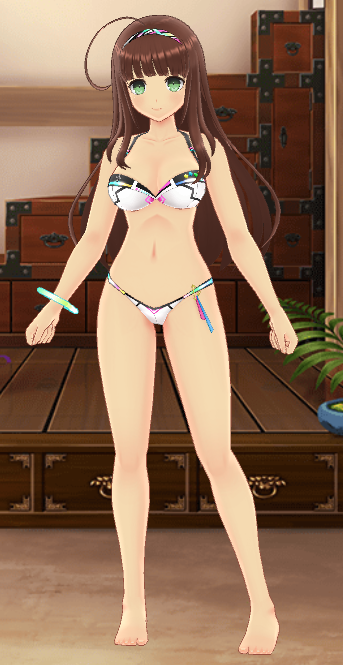
MEをAIにいじってもらいましょう。
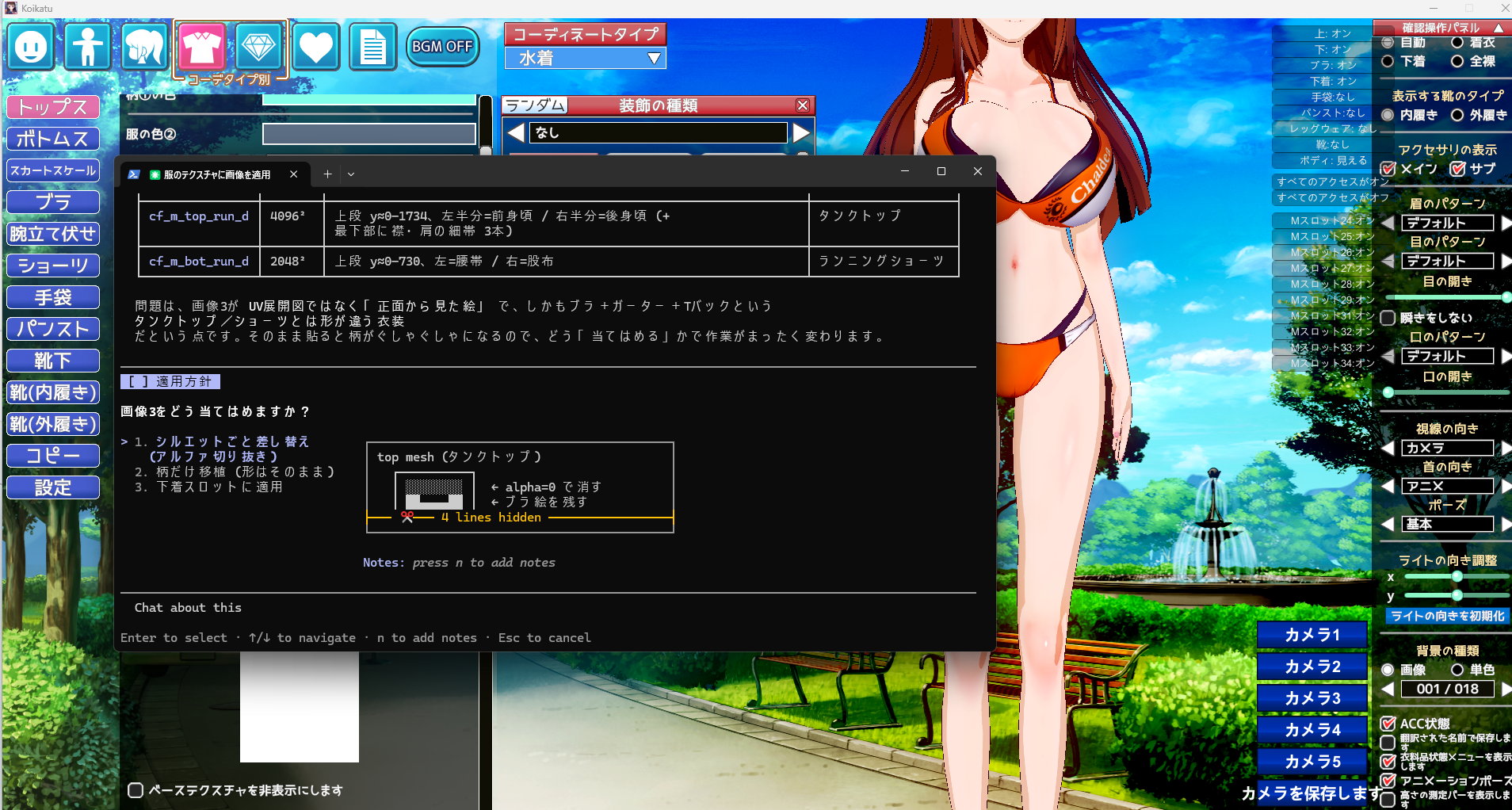
なんかいい感じにできます。
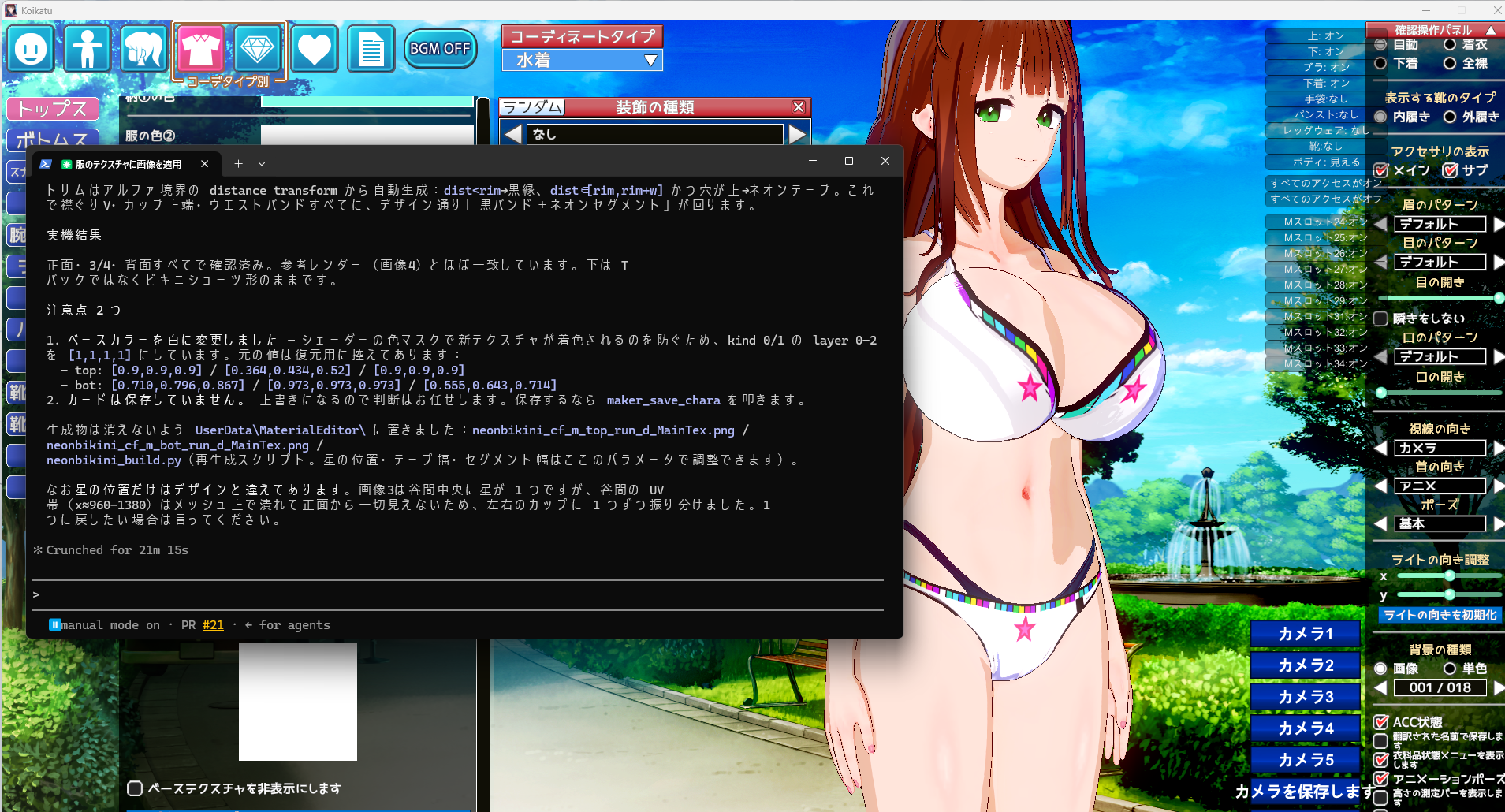
SKILL.md を表示
---
name: kk-me-cutout
description: >
  Koikatsu Maker 上のキャラの **パーツの一部を切り抜いて消す / 抜けていない板を直す**
  (髪の一房だけ削る、リボンの鈴だけ消す、mod 髪が黒い四角ブロックになる等)。
  **必ず診断から入る** → `scripts/probe_textures.cs` でバインド状況を確認。
  ⚠ **`_MainTex` 欠落は不具合とは限らない**: KK はバニラ髪も `_MainTex` を持たず、メッシュ形状自体が
  房になっている (実測済み)。vanilla をスライスした mod (「付け毛」系) はパック全体が `_MainTex` 無しで正常。
  板かどうかは `maker_set_renderer_enabled` の on/off + スクショで実機確認してから判断する。
  3 ルート: ⓪ **C: テクスチャ移植** — 左右ペア mod の**片側だけ** `_MainTex` 欠落で相方が持っている場合のみ
  (UV は同一なので吸って貼るだけ)。① **A: Renderer Off** — サブメッシュが分かれていれば
  `maker_set_renderer_enabled false`。② **B: アルファ抜き** — `maker_export_uv_map` で UV
  ワイヤーフレーム + **UV アイランドマスク** (島ごとに固有色) を書き出し → マスクを _MainTex に
  貼って `maker_screenshot` で **どの色がどの部位か** を実機同定 → `cut_alpha.cs` で該当島の
  alpha を 0 に → `maker_set_chara_material_texture` で戻す。
  ⚠ **material 名はスロット間で衝突する**。書き込み系は `origin` (例 'accessory:22') を必ず渡す —
  省くと同名を持つ全スロットに書き込まれ、スロットごとの ME 編集が不可逆に潰れる。
  ⚠ `maker_get_accessories` の `slot` は 0 始まり、Maker UI 表示はそれ +1。ユーザの番号がどちらかは
  確認してから着手する。
  ⚠ 検証は AutoEnterMaker セッションでは不可 (mod アセットが読めない)。
  「このパーツの一部を消したい」「髪の一房を削って」「切り抜きたい」「不要な部分を透過して」
  「黒い板になってる」「MaterialEditor で消す」等で起動。引数: `/kk-me-cutout [<対象の説明>]`
---

# kk-me-cutout — Maker のパーツを一部だけ切り抜く

出典の考え方は [Material Editor を使ってみよう。(初級編)](https://koikatsu-info.net/create/material-editor%E3%82%92%E4%BD%BF%E3%81%A3%E3%81%A6%E3%81%BF%E3%82%88%E3%81%86%E3%80%82%EF%BC%88%E5%88%9D%E7%B4%9A%E7%B7%A8%EF%BC%89/)。記事の GUI 手順 (Export UV Map → Export Texture → 画像編集 → Import Texture) を MCP ツールに置き換え、**「どの UV 領域がどの部位か」を目視推測でなく実機で確定させる**工程を足したもの。

前提: ゲームが **Maker** 起動中で `http://127.0.0.1:8765/health` が `maker:true`。書き戻しには `KK_MaterialEditor.dll` が必要 (書き出し側は不要)。

## ⓪ 診断が先

**いきなりアルファ編集を始めない。** アルファテスト系の髪 (`_Cutoff` を持つ) では、切り抜きは `_MainTex` の**アルファチャンネル + `_Cutoff`** で行われる。

```
dotnet run scripts/probe_textures.cs -- --origin accessory:18
```

### ⚠ `_MainTex` 欠落 ≠ 不具合 (2026-08 実測で訂正)

**`_MainTex` が未割当でも、それ自体は異常ではない。** KK の**バニラ髪も `_MainTex` を持たない** (front hair 5 で実測: `_MainTex` MISSING / `_DetailMask` OK)。KK の髪はメッシュのジオメトリ自体が房の形なので、テクスチャのアルファで抜く必要がない。

vanilla 髪をスライスして再パッケージした mod (例 `yamadamod.acchairF*` の「付け毛」系) は**パック内の全パーツが `_MainTex` 無し**で、それが正常動作。「`_MainTex` が無い → 板になっている」と決めつけると、正常なパーツを壊しにいくことになる。

**板かどうかは実機で確認する**こと。renderer 名がそのスロット固有なら、これが最短で確実:
```
maker_set_renderer_enabled {rendererName:"<r>", enabled:false}   # → maker_screenshot
maker_set_renderer_enabled {rendererName:"<r>", enabled:true}    # → 必ず戻す
```
消しても見た目が変わらない / 消すと正しい隙間ができるなら、そのパーツは正常に描画されている。

ルート C を使ってよいのは、**左右ペアの片側だけが欠けていて、もう片側が同じ material 名で `_MainTex` を持っている**ことを実測で確認できた場合だけ。

| 状況 | ルート | 手数 |
|---|---|---|
| 左右ペアの**片側だけ** `_MainTex` 欠落 (相方は保持) | **C: テクスチャ移植** | 2 コール |
| 消したい部分が**独立した Renderer** (ME の Renderer 欄が複数ある) | **A: Renderer Off** | 1 コール |
| 消したい部分が 1 Renderer 内の**一部のポリゴン** | **B: アルファ抜き** | 下記フルワークフロー |

### ルート C — 兄弟マテリアルから `_MainTex` を移植
mod の髪は左右対称ペアを `<mat>` / `<mat>_i` (mirrored) の 2 マテリアルで出すことが多く、**片方だけテクスチャが欠けている**個体がある。メッシュが対称ペアなら **UV レイアウトは同一** (ミラーは 3D 側だけ) なので、正常な側のテクスチャをそのまま流用できる。

```
# ① 正常な側から吸い出す
maker_export_chara_material_texture {materialName:"cf_m_hair_f_11_00",   origin:"accessory:17",
                                     propertyName:"_MainTex", path:"<work>\donor.png"}
# ② 壊れている側に貼る
maker_set_chara_material_texture    {materialName:"cf_m_hair_f_11_00_i", propertyName:"_MainTex",
                                     path:"<work>\donor.png"}
```
移植前に UV が本当に一致するか確認するなら、両方に `maker_export_uv_map` をかけてワイヤーフレーム PNG を比較する (一致なら画素一致率 ≈ 1.0、`islands[].uvBounds` も完全一致)。**ミラー反転していても UV は同じ**ことが多いので、`mirror-U` 比較で高い方を採る判断は誤り — 実測して決める。

シェーダーが違っていても (`KKUTShair` vs `Shader Forge/main_hair_front`) `_MainTex` の意味は同じなので、シェーダーを揃える必要はない。

### ルート A
```
maker_set_renderer_enabled {rendererName:"<sub>", enabled:false}
```
⚠ **rendererName はスロットを跨いで一致した全 renderer に効く** (ME の仕様)。同じ mod を 2 スロットに入れていると両方消える。`maker_list_renderers` で同名が複数 origin に出たらルート A は使えない → ルート B へ。

## ルート B — アルファ抜きフルワークフロー

### ① 対象の特定
```
maker_get_accessories                       # 返る `slot` は 0 始まり (配列 index)
maker_list_chara_materials {originFilter:"accessory"}
```
- `maker_get_accessories` の `slot` = **0 始まりの配列 index**で、`origin` の `accessory:<index>` と同じ値。Maker UI の表示番号はこれ **+1**。
- ⚠ **ユーザの言うスロット番号がどちらの系かは自明ではない**。空きスロットがあると両者はズレる。曖昧なら `includeEmpty:true` で空きの位置を確認し、mod 名 (`maker_list_parts` の `name`/`guid`) まで突き合わせてから確認を取る — 番号を取り違えると別パーツを不可逆に潰す。
- 控えるもの: `rendererName` / `material` / `shader` / `origin`。以降の全コールで `origin` を渡す。

### ⚠ material 名はスロット間で衝突する — 書き込みには必ず `origin` を渡す

同じ mod を 2 スロットに入れると **material 名まで同一**になる (例: `cf_m_hair_f_11_00` が accessory:17 と accessory:21 の両方)。`maker_set_chara_material*` は material **名**で書くため、`origin` を省くと `ForEachTarget` が**同名を持つ全スロットに書き込む**。

ME の GUI はスロット単位で書けるので、**スロットごとに別々のテクスチャが入っている状態は普通に存在する**。そこへ `origin` 無しで書くと**全スロットが同じテクスチャに潰れ、ツールからは復元できない** (name ベースの reset が無いため)。

→ 書き込み系には `origin` を渡す (2026-08 追加):
```
maker_set_chara_material_texture {materialName:"<m>", origin:"accessory:22", propertyName:"_MainTex", path:"<...>"}
maker_set_chara_material         {materialName:"<m>", origin:"accessory:22", propertyName:"_Cutoff", floatValue:0.5}
```
`origin` は `maker_set_chara_material` / `_texture` / `_texture_transform` / `_shader` / `_render_queue` の全てで使える。指定した origin に該当が無ければ**黙って全書きせずエラーになる**。

作業前に必ず**全スロットのテクスチャを個別に書き出して**おくこと (`probe_textures.cs --dump-dir`)。これが唯一の復元手段。

### ② 書き出し (UV マップ + 現行テクスチャ)
```
maker_export_uv_map {rendererName:"<r>", origin:"accessory:18",
                     path:"<work>\uv.png"}
maker_export_chara_material_texture {materialName:"<m>", origin:"accessory:18",
                                     propertyName:"_MainTex", path:"<work>\main.png"}
```
`maker_export_uv_map` は 2 枚出す (どちらも _MainTex と同寸法なので重ねられる):
- `uv.png` — 白いワイヤーフレーム (記事の Export UV Map 相当、人間用)
- `uv_islands.png` — **UV アイランドマスク**。UV 空間で連結した島ごとに固有のフラット色。アンチエイリアス無しなので色の完全一致で島を選択できる。

戻り値の `islands[]` に `id` / `colorHex` / `triangles` / `uvBounds` / `worldBounds` が入る。`worldBounds.center` は KK ワールド座標 (頭は y≈1.4〜1.6) なので、**「頭頂の左寄り」のような位置指定はここで機械的に絞れる**。

### ③ 島の同定 — プローブテクスチャで実機確認 (**推測しない**)
`worldBounds` だけで決め打ちしない。マスクをそのまま _MainTex に貼れば、どの色がどの部位かは画面上で一意に読める。

```
dotnet run scripts/probe_tex.cs -- --mask <work>\uv_islands.png --out <work>\probe.png
maker_set_chara_material_texture {materialName:"<m>", propertyName:"_MainTex", path:"<work>\probe.png"}
maker_set_camera {targetPos:[0,1.5,0], distance:0.9}
maker_screenshot {width:900, height:900}
```
スクショで消したい部位を覆っている色を読み、`islands[].colorHex` と突き合わせて島 id を確定する。複数の島に跨っていれば全部拾う。

`probe_tex.cs` は透明背景をつぶした不透明版を作る (マスクを直貼りすると alpha test で全部消えて何も見えない)。

### ④ 切り抜き
```
dotnet run scripts/cut_alpha.cs -- --texture <work>\main.png --mask <work>\uv_islands.png \
       --islands "#FF3B00,#00A2FF" --out <work>\cut.png
```
- `--dilate 2` (既定) で選択を 2px 太らせる。境界の 1px 残り (バイリニア補間で出る糸のような輪郭) を消すため。
- 島で選べない (大きい島の一部だけ削りたい) 場合は `--rect u0,v0,u1,v1` を併用。UV 空間 0..1、v は下端起点。
- `--keep-only` で反転 (指定島「以外」を消す = 一房だけ残す)。

### ⑤ 書き戻し
```
maker_set_chara_material_texture {materialName:"<m>", propertyName:"_MainTex", path:"<work>\cut.png"}
```

### ⑥ `_Cutoff` の確認 (**ここで失敗しがち**)
alpha=0 にしても、シェーダーが alpha test を通していなければ透明にならない。`maker_list_chara_materials` の `commonProps` に `_Cutoff` があれば alpha test 系。透明にならなければ:
```
maker_set_chara_material {materialName:"<m>", propertyName:"_Cutoff", floatValue:0.5}
```
alpha 0 は任意の正の cutoff を下回るので 0.5 で確実に抜ける。ただし `_Cutoff` を上げると**元テクスチャの半透明部分も一緒に消える**ので、元の値から動かした場合は必ずスクショで全体を確認する。

### ⑦ 確認 → 保存
```
maker_screenshot {width:900, height:900}
maker_save_chara {path:"<...>.png"}
```
ME のテクスチャ差し替えは MaterialEditorCharaController 経由で記録されるのでカードに焼き込まれる。

## 落とし穴

- **MCP クライアントの tools/list キャッシュ**: プラグインを入れ替えても、クライアント側は古いツール一覧を持ち続ける。新ツールが見えないときは (リポジトリルートから) `dotnet run tools/mcp-call.cs -- <tool> --args-file args.json` で直接 JSON-RPC を叩く (`--image out.png` でスクショも保存可)。Windows パスをシェル経由の JSON で渡すと `C:\Users` の `\U` が JSON エスケープエラーになるので、引数は `--args-file` で渡す。
- **AutoEnterMaker では検証しない**: KKMCP の dev フラグ `AutoEnterMaker` でタイトルから Maker に直行したセッションは **mod のアセットバンドルが読めない** (CAB 衝突)。カードを読んでも顔・体しか反映されず、髪・アクセが既定に落ちるので、この状態での検証は全て無意味になる。mod 絡みの作業は必ずタイトルから手動で Maker に入る。
- **renderer 名の重複**: `cf_hair_f_11` のように同じ mod を 2 スロットに入れると renderer 名も material 名も衝突し得る。`origin` を渡さないと export ツールは "ambiguous" で落ちる (**わざと落とす** — 黙って片方を掴むより安全)。material 名まで同一なら `rendererName` も併せて渡す。
- **書き込みは `origin` 必須**: export と違い、書き込み系は `origin` 省略時に "ambiguous" で落ちず**全スロットに書く**。ここが一番危険。→ 上の「material 名はスロット間で衝突する」節。
- **`maker_set_renderer_enabled` は rendererName 一致の全スロットに効く**: 診断で on/off する時も、その名前が 1 スロット固有かを `maker_list_renderers` で先に確認する。なお ME コントローラに Enabled が記録されるので、戻す時は明示的に `true` に戻す。
- **元に戻せない**: `maker_set_chara_material_texture` に name ベースの reset は無い。**②で書き出した `main.png` が唯一の復元手段**なので消さない。作業前に `maker_save_chara` でカードのバックアップを取る (絶対パス指定でその場所に書かれる)。
- **左右ペアの RGB は透明部だけ違う**: `<mat>` と `<mat>_i` は **alpha>0 の画素では RGB が完全一致**し、差は alpha=0 の領域 (不可視のゴミ色) だけ、というのが実測結果。よって片側の切り抜きを相方へ移すときは**アルファチャンネルだけ移植**すれば十分で、RGB は触らない方が安全。
  ※ 差分ツールによっては**完全透明画素を無視する** (例: PIL の `ImageChops.difference(...).getbbox()`) ので、「アルファの違いだけ」に見えることがある。RGB を本当に比べたいならアルファを捨ててから比較すること。
- **マスクとテクスチャの寸法**: `maker_export_uv_map` は _MainTex から寸法を取るので既定で一致する。`width`/`height` を明示指定した場合は `cut_alpha.cs` が NEAREST (PIL と同じサンプル位置) で合わせる (フラット色を壊さないため決してスムージングしない)。
- **UV が 0..1 の外**: タイリング前提のマテリアルだと島が枠外にはみ出す。戻り値に `uvOutOfRange` が出たらアルファ抜きでは正しく消えない (テクスチャが繰り返されるため) → ルート A か mod 差し替えを検討。
- **ObjImport 併用時**: ObjImport メッシュに対する ME テクスチャは save→reload で外れる既知の race がある ([`obj-hair`](../obj-hair/SKILL.md) 参照)。vanilla / mod パーツなら問題ない。
- **プローブの後始末**: ③でプローブを貼ったら、④の書き戻しか元 `main.png` の再 import で必ず戻す。貼りっぱなしのまま保存するとカードにプローブ色が焼き付く。

## ツール / スクリプト
本スキルが依存する 2 ツールは本リポジトリで追加したもの:
- `maker_export_chara_material_texture` — `MakerExportCharaMaterialTextureTool.cs` (ME 不要)
- `maker_export_uv_map` — `MakerExportUvMapTool.cs` (ME 不要、UV アイランド分解込み)

`scripts/` は .NET 10 ファイルベースアプリ。`dotnet run scripts/<name>.cs -- <args>` で実行する (初回のみビルドで数秒、`--help` で使い方)。共有コードは `tools/lib/` (`KkMcp.cs` = raw socket JSON-RPC、`Cli.cs` = 引数、`Png.cs` = PNG 入出力) を `#:include` している。
| ファイル | 役割 |
|---|---|
| `probe_textures.cs` | **⓪ 診断**: 各マテリアルにどのテクスチャが実際にバインドされているか列挙。`_MainTex` 欠落を検出 |
| `probe_tex.cs` | アイランドマスクを不透明化してプローブ用 `_MainTex` を作る (③ の同定用) |
| `cut_alpha.cs` | 島 (`colorHex`) / UV 矩形を選択してアルファを 0 にする (④ の切り抜き本体) |

## 関連
- [`obj-hair`](../obj-hair/SKILL.md) — ME テクスチャでツヤを作る側 (足す方向)
- [`kk-hair`](../kk-hair/SKILL.md) — パーツを重ねて髪型を組む側
- 記事の「おまけ」: 位置が掴めない時はカラーグリッド/UV グリッド画像を貼る、という手法 → 本スキルではアイランドマスクのプローブがその上位互換
scriptsのコードはこちら
cut_alpha.cs
#!/usr/bin/env dotnet
#:package StbImageSharp@2.30.*
#:package StbImageWriteSharp@1.16.*
#:include ../../../../tools/lib/Cli.cs
#:include ../../../../tools/lib/Png.cs

// Knock the alpha out of selected UV islands in a KK material texture.
//
// Consumes the two PNGs that `maker_export_uv_map` writes (the island mask) and
// `maker_export_chara_material_texture` writes (the live _MainTex), and produces
// a new texture whose selected islands are fully transparent. Feeding that back
// through `maker_set_chara_material_texture` is what actually cuts the part away
// in game (alpha test — see SKILL.md on _Cutoff).
//
// Island colours come verbatim from the tool's `islands[].colorHex` field, so no
// eyedropper step is needed. `--keep-only` inverts the selection: everything but
// the listed islands is cut, which is how you isolate a single strand.

using System.Globalization;

const string Usage = """
    usage: dotnet run cut_alpha.cs -- --texture main.png --mask main_islands.png
                                      [--islands "#FF3B00,#00A2FF"] [--rect u0,v0,u1,v1 ...]
                                      --out cut.png [--dilate 2] [--keep-only] [--blacken]

      --texture   Source texture PNG (exported _MainTex).
      --mask      Island mask PNG from maker_export_uv_map.
      --islands   Comma-separated island colours (colorHex field).
      --rect      UV-space rectangle (0..1, v measured from the bottom) to add to the
                  selection. Repeatable. Use when the unwanted geometry is part of a
                  larger island and cannot be selected by colour.
      --out       Output PNG path.
      --dilate    Grow the selection by N pixels before cutting (default 2).
      --keep-only Invert: cut everything EXCEPT the listed islands.
      --blacken   Also zero the RGB of cut texels (for shaders that ignore alpha).
    """;

var cli = new Cli(args, Usage, ["texture", "mask", "islands", "rect", "out", "dilate"], ["keep-only", "blacken"]);
string texturePath = cli.Require("texture", Usage);
string maskPath = cli.Require("mask", Usage);
string outPath = cli.Require("out", Usage);

var tex = RgbaImage.Load(texturePath);
int w = tex.Width, h = tex.Height;
var texPx = tex.Px;
// The export tool sizes the mask off _MainTex, so a mismatch means the two
// came from different calls. Nearest keeps the flat island colours exact —
// never resample this with a smoothing filter. Mask alpha is ignored.
var maskPx = RgbaImage.Load(maskPath).ResizeNearest(w, h).Px;

var colors = cli.Get("islands", "").Split(',', StringSplitOptions.TrimEntries | StringSplitOptions.RemoveEmptyEntries)
    .Select(Rgba.Parse).ToList();
var rects = cli.GetAll("rect");
if (colors.Count == 0 && rects.Count == 0)
{
    Console.Error.WriteLine("cut_alpha: nothing selected — pass --islands and/or --rect");
    return 2;
}

var sel = new bool[w * h];
var perColor = new List<(Rgba Color, int Count)>();
foreach (var c in colors)
{
    int n = 0;
    for (int i = 0; i < maskPx.Length; i++)
    {
        if (maskPx[i].SameRgb(c))
        {
            sel[i] = true;
            n++;
        }
    }
    perColor.Add((c, n));
}

var missing = perColor.Where(p => p.Count == 0).Select(p => p.Color.Hex).ToList();
if (missing.Count > 0)
    Console.Error.WriteLine($"cut_alpha: WARNING these colours matched 0 pixels: {string.Join(", ", missing)}");

foreach (string spec in rects)
{
    var parts = spec.Split(',').Select(p => double.Parse(p, CultureInfo.InvariantCulture)).ToArray();
    if (parts.Length != 4) throw new ArgumentException($"--rect expects u0,v0,u1,v1, got '{spec}'");
    var (u0, v0, u1, v1) = (parts[0], parts[1], parts[2], parts[3]);
    int x0 = (int)Math.Round(u0 * w), x1 = (int)Math.Round(u1 * w);
    if (x0 > x1) (x0, x1) = (x1, x0);
    // UV v runs bottom-up; image rows run top-down, so flip here.
    int ry0 = (int)Math.Round((1.0 - v1) * h), ry1 = (int)Math.Round((1.0 - v0) * h);
    if (ry0 > ry1) (ry0, ry1) = (ry1, ry0);
    x0 = Math.Max(0, x0); x1 = Math.Min(w, x1);
    ry0 = Math.Max(0, ry0); ry1 = Math.Min(h, ry1);
    for (int y = ry0; y < ry1; y++)
        for (int x = x0; x < x1; x++)
            sel[y * w + x] = true;
    Console.WriteLine($"  rect {spec} -> px x[{x0}:{x1}] y[{ry0}:{ry1}]");
}

sel = Dilate(sel, w, h, cli.GetInt("dilate", 2));
bool keepOnly = cli.Has("keep-only"), blacken = cli.Has("blacken");

int cut = 0;
for (int i = 0; i < texPx.Length; i++)
{
    if (sel[i] == keepOnly) continue;
    cut++;
    texPx[i].A = 0;
    if (blacken) texPx[i].R = texPx[i].G = texPx[i].B = 0;
}

tex.Save(outPath);

int total = w * h;
Console.WriteLine(string.Create(CultureInfo.InvariantCulture,
    $"cut_alpha: {texturePath} -> {outPath}  ({cut}/{total} texels cut, {100.0 * cut / total:F1}%)"));
foreach (var (c, n) in perColor)
    Console.WriteLine($"  {c.Hex} : {n} texels");
return 0;

// Binary dilation, one 4-neighbour step per iteration.
// A couple of pixels of growth kills the 1px fringe left at island borders by
// the rasteriser and by the texture's own bilinear filtering. Without it a
// cut part tends to leave a thin outline floating in mid-air.
static bool[] Dilate(bool[] mask, int w, int h, int radius)
{
    var cur = mask;
    for (int r = 0; r < radius; r++)
    {
        var grown = (bool[])cur.Clone();
        for (int y = 0; y < h; y++)
        {
            for (int x = 0; x < w; x++)
            {
                int i = y * w + x;
                if (cur[i]) continue;
                grown[i] = (y > 0 && cur[i - w]) || (y < h - 1 && cur[i + w])
                        || (x > 0 && cur[i - 1]) || (x < w - 1 && cur[i + 1]);
            }
        }
        cur = grown;
    }
    return cur;
}
probe_tex.cs
#!/usr/bin/env dotnet
#:package StbImageSharp@2.30.*
#:package StbImageWriteSharp@1.16.*
#:include ../../../../tools/lib/Cli.cs
#:include ../../../../tools/lib/Png.cs

// Turn an island mask into an opaque probe texture for on-screen identification.
//
// The island mask from `maker_export_uv_map` is transparent outside the islands,
// which makes it useless as a live _MainTex under an alpha-test shader — the whole
// part would vanish. This flattens it onto an opaque background so every island
// shows up as a flat colour on the model. Push it into _MainTex, take a
// `maker_screenshot`, and read off the colour sitting on the part you want to
// delete; that hex is the island id to hand to cut_alpha.cs.
//
// Restore afterwards by re-importing the original exported texture — MaterialEditor
// has no name-based reset path.

const string Usage = """
    usage: dotnet run probe_tex.cs -- --mask main_islands.png --out probe.png
                                      [--background "#202020"] [--texture base.png] [--blend 1.0]

      --mask       Island mask PNG from maker_export_uv_map.
      --out        Output PNG path.
      --background Colour for texels outside every island (default #202020).
      --texture    Optional base texture; islands are blended over it at --blend opacity.
      --blend      Island opacity over --texture, 0..1 (default 1.0 = flat colours).
    """;

var cli = new Cli(args, Usage, ["mask", "out", "background", "texture", "blend"]);
string maskPath = cli.Require("mask", Usage);
string outPath = cli.Require("out", Usage);

var mask = RgbaImage.Load(maskPath);
int w = mask.Width, h = mask.Height;

Rgba[] basePx;
if (cli.Get("texture") is { } texturePath)
{
    basePx = RgbaImage.Load(texturePath).ResizeNearest(w, h).Px;
}
else
{
    basePx = new Rgba[w * h];
    Array.Fill(basePx, Rgba.Parse(cli.Get("background", "#202020")));
}

float blend = (float)Math.Clamp(cli.GetDouble("blend", 1.0), 0.0, 1.0);
var outPx = new Rgba[w * h];
int covered = 0;
for (int i = 0; i < outPx.Length; i++)
{
    var b = basePx[i];
    var m = mask.Px[i];
    if (m.A > 0)
    {
        covered++;
        outPx[i] = new Rgba(Mix(m.R, b.R), Mix(m.G, b.G), Mix(m.B, b.B), 255);
    }
    else
    {
        outPx[i] = new Rgba(b.R, b.G, b.B, 255);
    }
}

new RgbaImage(w, h, outPx).Save(outPath);

Console.WriteLine($"probe_tex: {maskPath} -> {outPath}  ({covered}/{w * h} texels covered by islands)");
return 0;

// Truncating like numpy's astype(uint8), so output matches the old Python tool.
byte Mix(byte island, byte under) => (byte)(island * blend + under * (1f - blend));
probe_textures.cs
#!/usr/bin/env dotnet
#:include ../../../../tools/lib/Cli.cs
#:include ../../../../tools/lib/KkMcp.cs

// Report which texture properties are actually BOUND on Maker materials.
//
// `maker_list_chara_materials` only probes colour/float properties, so it cannot
// tell you that a hair material is missing its _MainTex. Note that a missing
// _MainTex is NOT automatically a defect — vanilla KK hair has none and gets its
// strands from mesh geometry (see SKILL.md). Confirm "slab" with renderer on/off
// + screenshot before treating it as broken.
//
// Each material is probed by attempting `maker_export_chara_material_texture`,
// so anything reported OK also lands on disk when --dump-dir is given.

using System.Text.Json.Nodes;

const string Usage = """
    usage: dotnet run probe_textures.cs -- [--origin accessory:18 ...] [--props _MainTex,_AlphaMask]
                                           [--dump-dir out/]

      --origin   Origin to probe (e.g. 'accessory:18'). Repeatable. Default: all accessories.
      --props    Comma-separated property list to override the default probe set.
      --dump-dir Keep the exported PNGs here instead of a temp dir.
    """;

// KK / KKUTS hair + item shader texture slots worth probing. Anything not in a
// material's shader comes back as "no shader property" and is skipped.
string[] defaultProps =
[
    "_MainTex", "_AlphaMask", "_HairGloss", "_BumpMap", "_NormalMap",
    "_DetailMask", "_ColorMask", "_liquidmask", "_Texture2", "_Texture3",
    "_AnotherRamp", "_RimMask", "_HairMask", "_MaskAlpha", "_SpecularMap",
];

var cli = new Cli(args, Usage, ["origin", "props", "dump-dir"]);
var origins = cli.GetAll("origin");
var props = cli.Get("props") is { } p
    ? p.Split(',', StringSplitOptions.TrimEntries | StringSplitOptions.RemoveEmptyEntries)
    : defaultProps;
string outDir = cli.Get("dump-dir") ?? Path.GetTempPath();
Directory.CreateDirectory(outDir);

JsonNode listing;
try
{
    listing = KkMcp.Call("maker_list_chara_materials",
        origins.Count == 0 ? new JsonObject { ["originFilter"] = "accessory" } : new JsonObject());
}
catch (McpException e)
{
    Console.Error.WriteLine($"probe_textures: {e.Message}");
    return 1;
}

var targets = new List<(string Origin, string Renderer, string Material, string Shader)>();
foreach (var r in listing["renderers"]!.AsArray())
{
    string origin = (string)r!["origin"]!;
    if (origins.Count > 0 && !origins.Contains(origin)) continue;
    foreach (var m in r["materials"]!.AsArray())
        targets.Add((origin, (string)r["renderer"]!, (string)m!["material"]!, (string)m["shader"]!));
}

if (targets.Count == 0)
{
    Console.Error.WriteLine("probe_textures: nothing matched");
    return 2;
}

// Absolute path, so the in-game tool writes where this process expects it.
outDir = Path.GetFullPath(outDir);
var missingMain = new List<(string Origin, string Material)>();
foreach (var (origin, renderer, mat, shader) in targets)
{
    var bound = new List<string>();
    var absent = new List<string>();
    foreach (string prop in props)
    {
        string path = Path.Combine(outDir, $"probe_{origin.Replace(":", "")}_{mat}{prop}.png");
        try
        {
            var r = KkMcp.Call("maker_export_chara_material_texture", new JsonObject
            {
                ["materialName"] = mat,
                ["origin"] = origin,
                ["propertyName"] = prop,
                ["path"] = path,
            });
            bound.Add($"{prop}({r["width"]}x{r["height"]})");
        }
        catch (McpException e)
        {
            if (e.Detail.Contains("no texture bound", StringComparison.Ordinal))
                absent.Add(prop);
            else if (!e.Detail.Contains("no shader property", StringComparison.Ordinal))
                absent.Add($"{prop}!{e.Detail[..Math.Min(40, e.Detail.Length)]}");
            // "no shader property": not part of this shader; not interesting.
        }
    }
    Console.WriteLine($"{origin,-14} {renderer,-28} {mat,-28}");
    Console.WriteLine($"     shader : {shader}");
    Console.WriteLine($"     bound  : {(bound.Count > 0 ? string.Join(", ", bound) : "(none)")}");
    Console.WriteLine($"     empty  : {(absent.Count > 0 ? string.Join(", ", absent) : "(none)")}");
    if (absent.Contains("_MainTex")) missingMain.Add((origin, mat));
}

if (missingMain.Count > 0)
{
    Console.WriteLine();
    Console.WriteLine("!! no _MainTex bound on:");
    foreach (var (origin, mat) in missingMain)
        Console.WriteLine($"   {origin} / {mat}");
    Console.WriteLine("   Not necessarily a defect (vanilla KK hair has no _MainTex). Check with");
    Console.WriteLine("   maker_set_renderer_enabled on/off + screenshot before fixing. If it really");
    Console.WriteLine("   is a slab and a sibling (same mesh/UV) has one, copy it with");
    Console.WriteLine("   maker_export_chara_material_texture + maker_set_chara_material_texture.");
}
return 0;
kk-scene-audio timelineのピストン運動に連動した音声の追加
SKILL.md を表示
---
name: kk-scene-audio
description: >
  Studio シーンの「場面切替」 (camera cut / piston 周期変化 / seed) を検出して
  N+1 segments に分割し、 各 segment ごとに **Voice folder** (排他 enable で声・BGM
  切替) + **SE folder** (segment 内 piston パルスで打撃 SE 同期) を一括生成する
  統合スキル。 オプションで起動時の **シーン load** と完了後の **シーン save**
  も組み込み、 1 つの .png を入力 → `_audio` 付き .png 出力までを一気通貫で実行
  可能。 kk-voice-switch (voice のみ) + kk-audio-sync (SE 全体) の機能を
  segment 軸で組み合わせたもの。 子要素として音声 / SE オブジェクトは
  ユーザが配置する。 空 segment (piston event 0) の SE folder は skip。 既存 2
  skill とは別 prefix で併存可能。 「シーン丸ごと音響設計して」「カットごとに
  声と打撃音両方付けて」「scene audio」 等で起動。 引数: `/kk-scene-audio
  [<input.png>] [<output.png>]`
---

# kk-scene-audio

シーン全体の音響を **segment 単位で voice + SE を同時設計** する。 kk-voice-switch + kk-audio-sync を 1 つの discovery → preview → write フローに統合したもの。 さらに **scene load (前段) と scene save (後段)** を組み込んで .png → .png のパイプライン化が可能。

## scene I/O オーバービュー

```
[input.png] ──load──▶ in-memory scene ──audio design──▶ ──save──▶ [output.png]
   ^                                                                    ^
   scene_path 引数                                                       output_path 引数
   (省略時: 現在 load 済シーンを使う)                                       (省略時: <input>_<output_suffix>.png)
```

- **load** は `scene_path` が指定されたとき限定で実行。 引数なしなら現在 load 済のシーンを対象に
- **save** は `output_path` または `output_suffix` のいずれかが効く。 両方無指定なら save 自体 skip し、 ユーザに「`Ctrl+S` で保存して下さい」と案内
- **save_in_place** (危険) を `true` にすると入力ファイルを上書き保存 → **明示確認** 必須

### 起動パターン (引数バリエーション)

| 呼び方 | scene_path | output_path | 動作 |
|---|---|---|---|
| `/kk-scene-audio` | (なし) | (なし) | **現シーンで作業、 save しない** (ユーザ手動 `Ctrl+S`) |
| `/kk-scene-audio "" "out.png"` | (なし) | `out.png` | 現シーンで作業 → `out.png` に save |
| `/kk-scene-audio "in.png"` | `in.png` | (なし) | load `in.png` → 同 dir に `<stem>_audio.png` |
| `/kk-scene-audio "in.png" "out.png"` | `in.png` | `out.png` | load `in.png` → `out.png` (フル指定) |

**「現在 load 済のシーンを使いたい」場合は `scene_path` を空 or 省略**。 これにより:
- Phase 0 (scene load) を skip
- Phase 8-pre (入力 .bak バックアップ) も skip (元 .png が in-memory に紐付いていないため)
- 既存 in-memory シーンに直接 Seg*_Voice + Seg*_SE を追記
- save するなら `output_path` を指定、 さもなくば `Ctrl+S` 案内で終了

⚠ `scene_path` 空で `output_path` 指定する場合: 出力先が **完全に新規** なら問題なし。 既存ファイルへ上書きするときは事前バックアップを取ること。 また save_scene quirk により load 元 dir が前回 load のままなので、 `output_path` の dir が違う場合は **mv が必要になる可能性** あり ([[project_kkmcp_save_scene_quirks]] 参照)

## 出力構造

各 segment i (1-indexed, i ∈ [1, N+1]、 N = cut 数) に対して 2 folder:

```
<prefix>1_Voice   ← segment 1 [0, cut_1]   排他 enable で声を流す
<prefix>1_SE      ← segment 1 [0, cut_1]   piston パルスで打撃 SE
<prefix>2_Voice   ← segment 2 [cut_1, cut_2]
<prefix>2_SE      ← (segment 2 に piston events があれば)
...
<prefix>{N+1}_Voice
<prefix>{N+1}_SE
```

- `prefix` のデフォルト = `Seg` (例: `Seg1_Voice`, `Seg1_SE`, ...)
- piston events が 0 件の segment では SE folder は **作らない** (`create_empty_se=true` で強制生成可)
- voice / SE オブジェクト本体はユーザが各 folder の子に配置 (kk-audio-sync / kk-voice-switch と同方式)

## キーフレームパターン

### Voice folder (kk-voice-switch と同じ)

| folder | キー | 備考 |
|---|---|---|
| Voice_1 (segment_start=0) | `True@0, False@end` | 2 キー、 先頭 padding 不要 |
| Voice_i (i≥2) | `False@0, True@start, False@end` | 3 キー、 `False@0` は必須 padding |

⚠ Voice_i (i≥2) で `False@0` を省くと **Timeline は first kf 値 (True) を t<start に backwards hold する** → 冒頭から全 voice が同時再生されるバグ。 詳細: [[project_timeline_leading_kf_holds_backwards]]

### SE folder (kk-audio-sync の pulse + segment cap)

events `[e_0, e_1, ..., e_{M-1}]` (segment 内、 M ≥ 1) に対して:

```
False@e_0,       True@(e_0 + pulse_gap),
False@e_1,       True@(e_1 + pulse_gap),
...
False@e_{M-1},   True@(e_{M-1} + pulse_gap),
False@end_cap    ← segment_end をはみ出さないよう必須
```

- 計 **2M + 1** キー
- `end_cap` = `segment_end` (ぴったり) で OK。 ぴったり同じ時刻に別 folder の True と並ぶが、 異なる interpolable なので競合しない
- 先頭の `False@e_0` が Timeline first kf となり、 **t<e_0 は False に held される** → segment 開始時刻 < e_0 でも自動的に silent (padding 不要)
- `pulse_gap` デフォルト 0.03s。 `e_{M-1} + pulse_gap < end_cap` を保証 (もし `e_{M-1}` が `segment_end` に近すぎたら `end_cap = e_{M-1} + 2*pulse_gap` に push)

## 安全規約

- **preview 必須**: segments + 各 segment 内 events + 生成予定 folder 一覧をユーザに見せて承認
- **prefix 衝突確認**: `tree()` で `<prefix>*` 名が 1 つでも存在したら abort、 別 prefix 要求
- 既存 AudioTrigger / Voice_1..N (kk-audio-sync, kk-voice-switch の成果物) は **触らない**
- 書込み単位: 全 folder 作成 → 全 register_interpolable → 並列 keyframe 書込み → per-folder 検算

## パラメータ

### cut 検出 (kk-voice-switch から移植)

- `cut_mode` (enum, default `"auto"`) — `auto` / `period` / `camera` / `seed`
- `camera_delta_pos` (float, default 0.5) — `m` 単位
- `camera_delta_rot` (float, default 25.0) — deg
- `period_window` (float, default 6.0) — 秒
- `period_change_ratio` (float, default 1.25)
- `cut_times` (float[], optional) — seed mode 用
- `min_segment_duration` (float, default 1.5) — segment マージ閾値

### piston 検出 (kk-audio-sync から移植)

- `piston_target_mode` (enum, default `"auto"`) — `auto` / `manual` / `seed`
- `piston_target_object_id` (int, optional)
- `piston_axis` (enum, default `"auto"`)
- `pulse_gap` (float, default 0.03)
- `trigger_interval` (float, default 0.4) — segment 内 events 間最小間隔
- `sampling_rate` (float, default 0.01)
- `smoothing_window` (int, default 5)

### 出力命名 / レイアウト

- `prefix` (string, default `"Seg"`)
- `voice_suffix` (string, default `"_Voice"`)
- `se_suffix` (string, default `"_SE"`)
- `create_empty_se` (bool, default `false`) — events 0 の segment にも SE folder を作る
- `chunk_size` (int, default 20) — 並列書込みロット

### scene I/O

- `scene_path` (string, optional) — load 対象 .png のフルパス。 省略時は現在 load 済シーンを使う (load skip)
- `output_path` (string, optional) — save 先 .png のフルパス。 指定時はこれ優先
- `output_suffix` (string, default `"_audio"`) — `output_path` 未指定時のフォールバック。 入力 stem に suffix を付けて入力と同 dir に保存 (例: `bedroom.png` → `bedroom_audio.png`)
- `output_dir` (string, optional) — `output_path` 未指定 + 別 dir に書きたいときに使う
- `save_in_place` (bool, default `false`) — `true` だと入力 .png を上書き保存。 **必ずユーザに 1 回確認**
- `skip_save` (bool, default `false`) — `true` だと save 自体スキップしてユーザ手動保存に委ねる。 `scene_path` だけ指定して試行錯誤したいときに使う

## 使う MCP ツール

- `studio_timeline_playback({action:"status"})` — duration / interpolable 数
- `studio_timeline_list_interpolables` — 候補列挙
- `studio_timeline_list_interpolable_models` — camera/anime model 存在確認
- `studio_timeline_get_keyframes` — 候補 fetch + 検算
- `tree([objectId])` — prefix 衝突確認
- `studio_add_folder()` + `studio_rename_node` — folder 作成 (2(N+1) 個までを 1 ロットで)
- `studio_timeline_register_interpolable(objectId, owner="Timeline", id="objectEnabled")` — 各 folder に
- `studio_timeline_set_keyframe(name="Enabled", ownerObjectId, time, value)` — bool 必須
- `studio_load_scene(path, [additive])` — Phase 0 で `scene_path` 指定時のみ
- `studio_save_scene(path, [updateSavePath])` — Phase 8 で `skip_save=false` のとき
  - ⚠ **既知のバグ 1**: `updateSavePath=true` を渡すと **`Cannot set a constant field`** で fail。 必ず flag なしで呼ぶ (`updateSavePath` 引数自体を省略)
  - ⚠ **既知の不安定動作 (重大)**: `path` の dir 部分が **無視される場合がある**。 観測した症状:
    - 同一セッション内で初回 save: dir が無視されて load 元 dir に basename で書き出される (戻り値 `bytes:-1`)
    - 連続呼出し: 同 path に対する 2 回目以降の save は no-op (mtime 更新されず)
    - 別セッション / 別 basename: path 通り正しく書き出される (戻り値 `bytes` 実値)
    - 詳細・実例: [[project_kkmcp_save_scene_quirks]]
  - **必須対策** (確実に動かすため):
    1. save 前に必ず `cp <scene_path> <scene_path>.bak` で入力をバックアップ
    2. save 前に target `output_path` の basename を **入力と必ず変える** (`_audio` suffix 強制 / timestamp 等)
    3. save 直後に **意図 path で `Test-Path` 確認**。 無ければ load 元 dir を `ls -t | head` で走査して見つけ、 意図 dir に `mv`
    4. 戻り値の `bytes` は `-1` を返すことがあるので、 信頼せず **実ファイルの mtime + size で検証**
    5. 同一セッションで複数回 save を呼ばない (必要なら別 path にする)

⚠ KKMCP には batch keyframe API なし。 並列単発呼び出しで書く。 各 folder のキー数を合計して `chunk_size` ごとに発射。

## アルゴリズム

### Phase 0: scene load (optional)

- `scene_path` 引数が **空 or 省略** なら:
  - load は実行せず、 現 in-memory シーンを対象にする
  - `studio_timeline_playback({action:"status"})` で duration / interpolableCount を取って、 ユーザに「現シーン (duration=X.Xs, N interpolables) で続行します」と確認表示
  - `tree()` で既存 folder 状況 (特に AudioTrigger / Voice_* / Seg*) も確認、 prefix 衝突回避を念入りに
  - Phase 8-pre の入力 .bak バックアップは **不要** (load 元 .png が無いため)
- `scene_path` 引数があれば:
  1. `tree()` で現在シーンに未保存差分がありそうか (folder / interpolable 多数) を一瞥して、 必要ならユーザに「現シーン破棄して `<scene_path>` を load して良いか」確認
  2. `studio_load_scene(path=<scene_path>, additive=false)` で置換 load
  3. `studio_timeline_playback({action:"status"})` で duration / interpolableCount 確認 (load 成功検証)
  4. 続けて Phase 8-pre の入力 .bak バックアップへ進む

### Phase 1: cut detection (kk-voice-switch 流)

`cut_mode` 優先順:
1. `camera` — `cameraPos` / `cameraRot` / `cameraOPos` / `cameraORot` / `cameraFOV` のいずれかが registered なら、 隣接 keyframe Δ で cut 候補生成
2. `period` — 主 piston motion を 1 つ確定し、 sliding window autocorr で周期変化点を cut に
3. `seed` — `cut_times` をそのまま採用

`cut_mode="auto"` のときは上記順に試して最初に成立したソースを使う。 全失敗なら `cut_times` 要求。 cut 候補を `min_segment_duration` でマージして最終 cuts を確定。

### Phase 2: piston source 確定

cuts 検出に使ったソースとは **独立** に piston 検出ソースを選ぶ:
1. `piston_target_mode="auto"`: 全 `guideObjectPos` 候補を kk-audio-sync の ranking 法で並べてユーザ選択
2. `manual`: `piston_target_object_id` 指定
3. `seed`: `seed_times` から phase 推定

### Phase 3: per-segment event 抽出

piston source の raw keyframe local-minima 検出を全 timeline で実行 → events 全体リスト E。
各 segment i (`[start_i, end_i]`) について `events_i = [e ∈ E | start_i ≤ e < end_i]`。

注: segment boundary `start_i / end_i` 上の event は `start_i ≤ e < end_i` で前 segment 側に入れる (排他、 ダブり防止)。

### Phase 4: preview

```
=== Scene audio plan ===
duration: 60.0s
piston source: 男 148 ヒップ(time) X軸  (total 59 events)
cuts: [21.0, 35.5, 41.0, 44.0]  (mode=period)

segment       range              voice         SE (events / keys)
Seg1_Voice    [0.00, 21.00]      ✓             Seg1_SE  16 ev / 33 keys
Seg2_Voice    [21.00, 35.50]     ✓             Seg2_SE  28 ev / 57 keys
Seg3_Voice    [35.50, 41.00]     ✓             Seg3_SE   1 ev /  3 keys
Seg4_Voice    [41.00, 44.00]     ✓             (skip - 0 events)
Seg5_Voice    [44.00, 60.00]     ✓             Seg5_SE  13 ev / 27 keys

folder total: 9  (5 voice + 4 SE)
keyframe total: 13 voice + 120 SE = 133 keys
```

ユーザ承認を得るまで書込み無し。

### Phase 5: collision check + folder 作成

1. `tree()` を grep して `<prefix>{i}_Voice` / `<prefix>{i}_SE` が 1 つでも存在すれば abort → 別 prefix 要求
2. `studio_add_folder()` を必要数並列発射 → 帰ってきた objectId をマップに保存
3. `studio_rename_node` で 1 つずつ rename (バッチ可)
4. `studio_timeline_register_interpolable(owner="Timeline", id="objectEnabled", objectId=...)` を全 folder に

### Phase 6: keyframe 書込み

per-folder の key 列を構築:

```python
def build_voice_keys(i, start, end):
    if i == 1 and start == 0:
        return [(0.0, True), (end, False)]
    return [(0.0, False), (start, True), (end, False)]

def build_se_keys(events, end, pulse_gap):
    keys = []
    for t in events:
        keys.append((t, False))
        keys.append((t + pulse_gap, True))
    last_true = events[-1] + pulse_gap
    cap = end if end > last_true + pulse_gap else last_true + pulse_gap
    keys.append((cap, False))
    return keys
```

全 folder の全 key を 1 つのキューに入れ、 `chunk_size` ずつ並列発射 (`studio_timeline_set_keyframe(name="Enabled", ownerObjectId, time, value=bool)`)。 ロット完了後、 該当 folder ごとの keyframeCount 検算、 不足あれば個別リトライ (3 回まで)。

### Phase 7: 検算 (post-apply)

- 各 folder の `studio_timeline_get_keyframes` を取り:
  - Voice_1: count=2, 値 `[True, False]`
  - Voice_i (i≥2): count=3, 値 `[False, True, False]`
  - SE_i: count = `2*M_i + 1`、 末尾は `False`、 内部は False/True 交互
- **冒頭検算 (t=0)**: 全 folder の first kf 値を集めて、 True なのは Voice_1 だけ、 残り全部 False を確認
- **boundary 検算**: 隣接 segment の Voice の (start, end) が連続していること

### Phase 8: scene save (optional)

**致命的注意**: `studio_save_scene` は `path` の dir を無視し、 **load 元 dir + 与えた basename** に書く。 入力ファイルと同じ basename を使うと **入力が無音で上書きされる**。 詳細: [[project_kkmcp_save_scene_quirks]]

#### Phase 8-pre: 入力バックアップ (必須、 ただし scene_path 省略時は skip)

`scene_path` が指定されていれば、 save 前に **必ず手動で入力をコピー**:

```powershell
Copy-Item "<scene_path>" "<scene_path>.bak"
```

Bash:
```
cp "<scene_path>" "<scene_path>.bak"
```

`scene_path` が空 or 省略の場合は、 load 元の .png が無いため backup は skip。 ただし `output_path` が既存ファイルへの上書きになる場合はユーザに「上書きして良いか」を明示確認すること。

#### Phase 8: save 本体

優先順:
1. `skip_save=true` → save しない。 ユーザに `Ctrl+S` 案内
2. `save_in_place=true` → 入力ファイルを上書きする計画を **明示提示** + バックアップ完了確認 → `studio_save_scene(path=<scene_path>)` (※ `updateSavePath` は渡さない)
3. `output_path` 指定:
   - `output_path` の basename が `scene_path` の basename と **同じ** なら、 そのまま save すると入力が上書きされる。 → **basename を変える** (例: `<stem>_audio.png` を強制)、 もしくは事前 `_audio` suffix を加える
   - `studio_save_scene(path=<output_path>)` を呼んで、 実際は **load 元 dir に basename で保存される** ことを認識
4. `scene_path` + `output_suffix` (default `_audio`) → `<dir>/<stem><suffix>.png` を組み立てて save → 結局 basename だけが効く
5. `scene_path` も `output_path` も無し → save 候補無し、 `Ctrl+S` 案内

#### Phase 8-post: 実出力の特定と移動

save 後の検証 + 修正:

```python
# 1. load 元 dir 内で最新の .png を見つける
latest = sorted(glob(load_dir + "/*.png"), key=os.path.getmtime)[-1]

# 2. 意図の output_path と違うなら mv
if latest != output_path:
    shutil.move(latest, output_path)

# 3. load 元 dir に意図しないファイルが残っていれば cleanup
```

⚠ 戻り値の `bytes` は信頼しない (`-1` が返ることがある)。 mtime ベースで実ファイルを探す。

#### 上書き save (`save_in_place=true`) の追加注意

- save 前に必ず `<scene_path>.bak` を作成
- save 後、 ユーザに「.bak が残っているので、 不要なら手動で削除して下さい」と案内

## 失敗モード診断

| 症状 | 原因 | 対処 |
|---|---|---|
| `cuts = 0` | 単一シーン (camera 静止 + piston 一定周期) | `cut_mode="seed"` に切替えてユーザに `cut_times` 指定要求 |
| segments 多すぎ (> 8) | camera cut 過密 / period_change_ratio 低すぎ | `min_segment_duration` を 3-5 に上げる / `period_change_ratio` を 1.5 に上げる |
| 冒頭で全 voice 同時再生 | Voice_i (i≥2) の `False@0` padding 漏れ | Phase 7 の冒頭検算で発見 → 該当 folder に `False@0` を追加 |
| segment 終端で SE が次の segment まで漏れる | SE folder の `end_cap` 漏れ / `e_{M-1}+pulse_gap > end` で cap が segment 外 | end_cap を `e_{M-1} + 2*pulse_gap` に push、 もしくは segment_end 内に強制クランプ |
| 同一 segment 内の voice と SE の同時鳴り過剰 | 設計通り (SE はパルス、 voice は連続) | 仕様、 ユーザに「子の音声 volume / 長さ調整で対応」案内 |
| prefix 衝突 abort | 過去実行残骸 | ユーザに既存 folder の削除 or 別 prefix 提供を要求 |
| `studio_load_scene` 失敗 (path 不正 / .png でない / 破損) | パス typo / 拡張子 / 中身 | ユーザにパス再確認、 abort して以降のフェーズに進まない |
| `studio_save_scene` 失敗 (親 dir 無し / 権限) | 出力先 dir が無い、 書込み不可 | ユーザにパス確認 + dir 事前作成依頼。 シーン状態は in-memory に残っているのでユーザ手動 save にフォールバック可 |
| save 後にシーン load し直すと音声が消える | `objectEnabled` interpolable に int 値を書いてしまった ([[project_timeline_leading_kf_holds_backwards]] の姉妹罠 + [`InvalidCastException`] 系) | 必ず JSON bool で書く。 KKMCP の `studio_timeline_set_keyframe` は bool 補正してくれるはずだが、 念のため write 直後の検算で bool であることを確認 |

## ユーザインタラクション

1. 起動時:
   - `scene_path` 引数あり → load 計画を提示 → ユーザ承認 → `studio_load_scene` → 入力 .bak backup
   - `scene_path` 空 or 省略 → **現 in-memory シーンを対象に** 続行する旨アナウンス (load skip, backup skip)
   - 続けて `studio_timeline_playback({action:"status"})` で duration 確認、 cut source 候補を提示
2. cut mode と piston source をユーザに選ばせる (auto なら 2 段階自動)
3. preview 表 (segments + events + 生成 folder + save 計画) を提示、 承認
4. prefix 衝突確認 → 衝突なら別 prefix 要求
5. 書込み完了後サマリ: folder 一覧 + objectId + 検算結果
6. save 実行:
   - `output_path` 空 or 省略 + `scene_path` 空 → save 自体 skip、 `Ctrl+S` 案内
   - `skip_save=true` → save スキップ、 `Ctrl+S` 案内
   - `save_in_place=true` → 上書き確認 → `studio_save_scene(<scene_path>)`
   - その他 → `<output_path>` or `<dir>/<stem>_audio.png` に save
7. 完了レポート: 入力パス (or 「現シーン」) / 出力パス / folder 数 / keyframe 数 / 検算結果。 子オブジェクト配置はユーザ作業として明示

## kk-audio-sync / kk-voice-switch との関係

- 旧 2 skill は **存続**。 単独 voice 切替 or 全体 piston SE が欲しい用途で個別呼び出し可
- kk-scene-audio は両方を segment 軸で結合した版。 細かいパラメータが多いので「シーン丸ごとお任せ」用途向け
- 既存 folder 名 (`AudioTrigger`, `Voice_*`) とは別 prefix (`Seg*`) を使うので **同一シーンに 3 系統共存可能**
- kk-audio-sync で `folder_name="Seg1_SE"` のような名前で個別生成、 後で kk-scene-audio で全体生成 → 名前衝突するので注意

## 注意事項

- **声 clip 長と segment 長のミスマッチ**: clip > segment だと境界で頭切り、 clip < segment だと無音区間ができる。 ユーザ側で loop / multi-clip 配置で対応
- **cut detection の robustness**: camera 不在シーンで period mode に降格、 piston 不在シーンで seed mode に降格、 という fallback 必須
- **batch mode は未対応**: 複数 .png シーンの一括処理は kk-audio-sync の Batch mode を参照 (将来統合する場合はそちらの 3-phase 構造を踏襲)
- **メモリ参照**: 関連の罠は [[project_timeline_leading_kf_holds_backwards]] と [[project_timeline_interpolable_name_mismatch]] を参照
- **save_in_place は破壊的**: 上書き保存すると元シーンに戻せない。 ユーザに明示確認 + 事前に手動コピー推奨を案内すること。 デフォは false 維持
- **load → save の dir 跨ぎ**: `scene_path` と `output_path` が別 dir だと、 出力先 dir が事前に存在しない場合 `studio_save_scene` が失敗する。 KKMCP には mkdir tool が無いので、 ユーザに `New-Item -ItemType Directory` 等で事前作成依頼するか、 同 dir 出力 (`output_suffix` のみ) に切替案内
zipmod zipmodをビルドする
SKILL.md を表示
---
name: zipmod
description: >
  Koikatsu の **キャラクリ MOD (.zipmod)** を作業フォルダにビルドする。
  ワークフロー: ① ワークフォルダ scaffold (manifest.xml + abdata/chara + abdata/list/characustom)
  → ② Blender MCP でモデリング・UV・FBX export → ③ **SB3UGS** で vanilla .unity3d を開いて
  mesh / texture を swap (Unity Editor 不要、 GUI 手順を案内) → ④ list csv をテンプレから生成
  → ⑤ 無圧縮 zip → 拡張子 .zipmod に rename → ⑥ ユーザが mods フォルダにコピー → ⑦
  KKMCP の `maker_list_parts` + `maker_set_*` で **Maker 上で実機検証**。
  対応 category は **キャラクリ系のみ** (bo_hair_* / ao_head / ao_face / co_top 等)。 Studio MOD ・
  ボイス追加 MOD は対象外。 出力は ワークフォルダ内に `<name>.zipmod` を作るだけ (KK/KKS の mods フォルダには触れない)。
  「zipmod 作って」「キャラクリ MOD 作って」「ヘアmod パッケージ化」「.zipmod 化」 等で起動。
  引数: `/zipmod [<work_dir>]`
---

# zipmod — キャラクリ MOD パッケージビルダー

ユーザが Blender でモデリングしたメッシュを Koikatsu の **キャラクリ MOD (.zipmod)** として組み立てる。 Sideloader が読み込む形式に従って `manifest.xml` + `abdata/chara/...unity3d` + `abdata/list/characustom/...csv` を構成し、 無圧縮 zip に固めて拡張子を `.zipmod` に変更する。 最後に KKMCP の Maker ツールで MOD が認識されているか確認するところまで。

`.unity3d` (AssetBundle) は **vanilla .unity3d を SB3UGS で開いて mesh / texture を swap** する mesh-swap 方式をデフォルトとする。 Unity Editor 不要。 この方式が Koikatsu mod コミュニティの主流。

参考:
- [Cz-999 / How_to_KKMOD wiki](https://github.com/Cz-999/How_to_KKMOD/wiki) — キャラクリ MOD 用ファイル構成 / ZipMod 作成
- [koikatsu-info.net /6229](https://koikatsu-info.net/uncategorized/6229/) — Blender + SB3U で BlendShape 込み mesh swap
- [note coshane](https://note.com/coshane/n/n739c3a230689) — SB3UGS で衣装 mod を作る具体的ワークフロー (FBX scale 0.001 等)

## ✅ 確立: Unity Editor batchmode build path (2026-05-13 verified, end-to-end render + Maker controls)

### 🔑 最重要: `ChaAccessoryComponent` + `N_move` 単一子構造を bundle root に bake する

Maker UI の **移動 / 回転 / 拡縮 / 色変更** を全部効かせるには 2 点必要:

1. **`ChaAccessoryComponent` MonoBehaviour を bundle root GameObject に attach** — これが無いと色も addMove も伝わらない
2. **bundle root の子は SMR を持つ GameObject 1つだけ** — KK の accessory loader は bundle root の `transform.GetChild(0)` を `objAcsMove[slot, 0]` として addMove (pos/rot/scale) の適用先にする。 ここに **FBX import 由来の `tsugumi_armature` (sibling Armature GameObject) が残ってると KK がそっちを wrapper として掴んで mesh の親じゃない方を動かす → mesh が動かない**。 慣習的に名前は `N_move` にする (Phantom 等 vanilla mod の構造に合わせる、 機能上は任意名でも OK)

実機で `scale=5` を入れて mesh が画面いっぱいに膨れるか確認すること。 膨れなければ ChaAccessoryComponent と N_move 単一子構造を疑う。

Unity Editor build path で実現する手順:

1. `<unity_project>/Assets/ChaAccessoryComponent.cs` (stub) を追加。 class name と field signature は KK 本物と一致させる:

   ```csharp
   using UnityEngine;
   public class ChaAccessoryComponent : MonoBehaviour {
       public SkinnedMeshRenderer[] rendNormal;
       public bool useColor01 = true;
       public Color defColor01 = Color.white;
       public bool useColor02 = false;  public Color defColor02 = Color.white;
       public bool useColor03 = false;  public Color defColor03 = Color.white;
       public SkinnedMeshRenderer[] rendAlpha;
       public Color defColor04 = Color.white;
       public SkinnedMeshRenderer[] rendHair;
       public bool noOutline = false;
       public bool initialize = false;
       public bool setcolor  = false;
   }
   ```

   Unity が `Assets/` 配下の MonoBehaviour を build 時に `Assembly-CSharp.dll` に compile し、 bundle の MonoScript の `m_ClassName="ChaAccessoryComponent"` + `m_AssemblyName="Assembly-CSharp.dll"` として焼き込む。 KK runtime はこの ClassName + AssemblyName で **KK 本物の `ChaAccessoryComponent` class に解決する** (中身は KK 側のもの)。

2. `BuildScript.BuildAll` で FBX をそのまま bundle 化せず、 **prefab を作って `tsugumi_armature` 子を削除 + SMR を持つ子を `N_move` にリネーム + ChaAccessoryComponent を attach してから bundle 化**:

   ```csharp
   // FBX import (animationType=Generic 等は従来通り)
   importer.assetBundleName = "";  // FBX 自体には bundle tag しない
   modelImp.SaveAndReimport();

   var fbxGo = AssetDatabase.LoadAssetAtPath<GameObject>(fbxPath);
   var inst = Object.Instantiate(fbxGo);
   inst.name = "<modname>";

   var smrs = inst.GetComponentsInChildren<SkinnedMeshRenderer>(true);

   // KK accessory loader treats bundle_root.transform.GetChild(0) as the
   // wrapper for addMove. Remove the FBX-import-spawned Armature sibling so
   // the SMR's GameObject becomes the SOLE child, and rename it "N_move"
   // (Phantom convention, optional but conventional).
   var armature = inst.transform.Find("tsugumi_armature");
   if (armature != null) Object.DestroyImmediate(armature.gameObject);
   foreach (var smr in smrs)
       if (smr.gameObject != inst) smr.gameObject.name = "N_move";

   var cac = inst.AddComponent<ChaAccessoryComponent>();
   cac.rendNormal = smrs;
   cac.useColor01 = true;
   cac.defColor01 = Color.white;
   // ...残りも初期化

   var prefab = PrefabUtility.CreatePrefab("Assets/<modname>.prefab", inst);
   Object.DestroyImmediate(inst);

   AssetImporter.GetAtPath("Assets/<modname>.prefab").assetBundleName =
       "chara/<author>/<modname>/<file>.unity3d";

   AssetDatabase.SaveAssets(); AssetDatabase.Refresh();
   BuildPipeline.BuildAssetBundles("Build", BuildAssetBundleOptions.None, BuildTarget.StandaloneWindows);
   ```

3. UnityPy patches (`recenter_mesh.py`, `selfroot_smr.py`, `fix_transform_scale.py`, `restore_axis_rotation.py`, `strip_animator.py`) は引続き全部必要

### 複数パーツの相対位置を保持 (shared reference バーテックス bake)

複数 mesh が **元のキャラクター・モデルでの相対位置関係** を持つ場合 (例: 8 個に分割された hair piece が頭の周囲に配置されてる)、 **per-mesh AABB 中心で recenter すると全 part が parent bone 位置に collapse して位置関係が壊れる**。 これを避けるには:

1. patch_all.py で **`REF_CENTER`** を共通点 (Blender world のキャラクター頭中心など) に固定し、 **全 part を同じ point に対して subtract**。 例: Blender (X=0, Y=平均, Z=頭中心) を Unity-imported space (× 84) に変換した値を REF にする
2. CSV の `Parent` 列を **全 part 同じ bone (例: a_n_headside)** に統一。 parent が違うと相対 reference が崩れる
3. mesh の m_LocalAABB は **center=(per-mesh-offset-from-REF) × SCALE** にする (`tt['m_LocalAABB']['m_Center']` を 0,0,0 にせず offset で残す)

各 part の最終位置 = parent_bone.world × N_move.local (-90°X rotation) × (vertex_offset_from_REF × SCALE)

REF を変えれば全 part が一律に shift される。 個別の微調整は **Maker UI slider** or `maker_set_accessory(adjustments[0].pos=...)` で行う。

### 複数パーツの一括化 (N parts → 1 zipmod)

1 zipmod に N 個の accessory entry を並列させる pipeline:

1. **Blender**: 各 LOD0 mesh に同じ Armature (single bone) を共有させて vertex group `Bone` weight=1.0 を割り当て、 個別 FBX で `Assets/<part>.fbx` に export
2. **BuildScript.cs**: `Parts[,]` テーブルを `{fbx, goName, bundleName}` の 3 列で持ち、 forで回して **各 FBX ごとに prefab を作って ChaAccessoryComponent attach + tsugumi_armature 削除 + N_move リネーム + bundle name tag**。 最後に `BuildPipeline.BuildAssetBundles(...)` を 1 回だけ呼べば全 bundle を 1 pass で書き出してくれる
3. **patch_all.py** (UnityPy): `PARTS` リストで bundle file 名を回し、 上の 5 patches (recenter, force_red, selfroot SMR, identity transform + axis flip rot, strip animator) を **bundle ごとに同じ手順で適用**。 引数化しておけば 8 件でも 80 件でも同じスクリプト
4. **csv**: cat 122 ao_head の `ID,Kind,Possess,Name,MainManifest,MainAB,MainData,Parent,HideHair,ThumbAB,ThumbTex` を N 行並べる (ID は連番で被らないこと, MainData は prefab GO 名と一致)。 同じ thumbnail asset を全行で参照しても OK
5. **zipmod build + KK cycle**: `Compress-Archive` のかわりに `[System.IO.Compression.ZipArchive]` を `NoCompression` で生成

検証: `maker_list_parts(122, nameFilter="<modname>")` で N 個全部の id を取って `maker_set_accessory(slot=0..N-1, type=122, id=<each id>)` でまとめて装着。

### 検証方法 (vanilla との比較)

`mcp__kkmcp__maker_list_parts(122, nameFilter="cap")` で vanilla mod の id を取って (例: Police Cap id=100027701) `maker_set_accessory` で slot に load → `adjustments` を slider 経由でも MCP でも動かしてみる。 vanilla が **slider drag に反応するが MCP には反応しない** ならば、 vanilla 側は ChaAccessoryComponent あり + addMove → transform の流れが効いてる証拠。 我々の mod は **slider drag にも反応しない** なら ChaAccessoryComponent が無い証拠 (この section の手順で追加)。


Mesh-swap 方式 (SB3UGS) で何度試しても **mesh が表示されない** のが続く場合、 **Unity Editor 5.6.2f1 で FBX → unity3d を build する path に切替えると確実に動く**。 ao_head accessory (cat=122, parent=`a_n_headside`) で Tsugumi back_A の mesh visible まで全 CLI で到達した。 必要なのは:

| 段階 | 重要点 | 失敗症状 |
|---|---|---|
| Blender FBX export | **mesh に Armature + single bone + vertex group weight=1.0** を必ず付ける | Unity が SkinnedMeshRenderer ではなく MeshRenderer として import し、 KK Accessory pipeline が **render しない** (`maker_list_renderers` には載るが画面に何も出ない) |
| Unity ModelImporter | `animationType = Generic`, `optimizeGameObjects=false`, `isReadable=true`, `globalScale = 8400` (FBX が 0.001 file scale な前提) | Generic 未設定だと skin data が無視されて SMR が生成されない |
| AssetBundle build | `BuildPipeline.BuildAssetBundles(out, None, BuildTarget.StandaloneWindows)`, FBX に `importer.assetBundleName = "chara/<author>/<modname>/<file>.unity3d"` 設定 | UNETStandalone 等 KK 非対応 target で build すると runtime に load されない |
| UnityPy 後処理 | (a) **mesh vertices × 0.001** (実際の scale は ModelImporter 設定が利かない場合があるため後付け), (b) AABB center→0, (c) **Mesh.bindPose の translation も × 0.001**, (d) SMR.m_AABB を local 0±0.5 等に reset, (e) **Object.002 / armature の Transform.m_LocalScale を 1.0 にリセット**, (f) **Transform.m_LocalRotation = (-0.7071,0,0,0.7071)** (Blender→Unity の -90°X 軸変換、 これを identity にすると mesh が顔面方向に出る), (g) **SMR.m_Bones / m_RootBone を SMR 自身の Transform に再 point + Mesh.bindPose を identity に reset (selfroot_smr.py)** — これをやらないと **Maker の adjustments (pos/rot/scale) が mesh に伝わらない**。 KK の `ChaAccessoryComponent` は SMR の GameObject だけを `ca_slotNN` 配下に reparent するため、 sibling の Armature/Bone 階層は孤立する。 SMR を self-root にすれば SMR 自身の transform が bone 役を兼ね、 ca_slotNN の調整が直接効く | scale 0.1 のままだと render される (= 確認できる) が 1.3 cm 級で見えない / adjustments が無視される |
| zipmod build | PowerShell `[System.IO.Compression.ZipArchive]` の `NoCompression` で archive 作る (`Compress-Archive -LiteralPath @()` は bracketed-path で fail する) | `Compress-Archive` の bug を踏むと zipmod が 2 KB の空殻になる |
| Sideloader 動作 | 起動毎に csv の id を **動的 remap** する。 `maker_list_parts(category, nameFilter="<modname>")` で実際の remapped id を取得してから `maker_set_accessory` を呼ぶ | CSV に書いた元 id をそのまま渡すと `maker_get_thumbnail: part not found` |

### 検証用 quick scripts (`<work>/_src/` に置く)

- `probe_unity_build.py` — built bundle の types / GameObjects / SMR / Mesh / AABB を 1 shot で dump
- `probe_built.py` — material / shader / bindPose / m_Skin の詳細
- `recenter_mesh.py` — Build/ から abdata/ にコピーしながら vertices × SCALE, AABB→origin, bindPose translation × SCALE
- `fix_transform_scale.py` — Object.002 / tsugumi_armature の Transform を scale=1.0 / rot=identity に置換
- `restore_axis_rotation.py` — 上の rot=identity を Blender→Unity 用の -90°X クォータニオンに戻す (顔面方向に出るのを back に戻す)
- `selfroot_smr.py` — SMR の m_Bones / m_RootBone を SMR 自身の Transform に向け直し、 Mesh.bindPose も identity に reset。 これで Maker の `adjustments` (pos/rot/scale) が SMR に伝わるようになる (これをやらないと完全に無視される)
- `force_red.py` — Material `_Color` を red にして「render されているか」を視認可能にする diagnostic (UnityPy で Material.m_SavedProperties.m_Colors を patch)

#### ⚠️ 色の制御 (Maker UI / accessory `colors[0..3]`) は KK 認識 shader が必要

Unity Standard shader の `_Color` には `ChaAccessoryComponent` が **何も書き込まない**。 Maker UI で color を変えても、 `colors` フィールドに値は保存されるだけで material には反映されない (実機で magenta 設定 → 真っ白のまま検証済)。 色を効かせるには material の m_Shader を **KK runtime に存在する shader (`Shader Forge/main_hair*` 等) に name 参照** で差替える必要がある (= bundle に shader を embed しない)。 Unity Standard を bundle に embed したままだと色は永遠に固定。

### Build 自動化用 BuildScript.cs

`<work>/_src/unity_project/Assets/Editor/BuildScript.cs`:

```csharp
using UnityEditor; using UnityEngine; using System.IO;
public class BuildScript {
    public static void BuildAll() {
        string fbxPath = "Assets/<name>.fbx";
        AssetImporter importer = AssetImporter.GetAtPath(fbxPath);
        importer.assetBundleName = "chara/<author>/<modname>/<file>.unity3d";
        var m = importer as ModelImporter;
        m.globalScale = 8400f;
        m.animationType = ModelImporterAnimationType.Generic;
        m.optimizeGameObjects = false;
        m.importBlendShapes = false;
        m.importAnimation = false;
        m.isReadable = true;
        m.SaveAndReimport();
        AssetDatabase.SaveAssets(); AssetDatabase.Refresh();
        if (!Directory.Exists("Build")) Directory.CreateDirectory("Build");
        BuildPipeline.BuildAssetBundles("Build", BuildAssetBundleOptions.None, BuildTarget.StandaloneWindows);
        EditorApplication.Exit(0);
    }
}
```

実行: `"C:\Program Files\Unity\Hub\Editor\5.6.2f1\Editor\Unity.exe" -batchmode -quit -nographics -projectPath "<work>/_src/unity_project" -executeMethod BuildScript.BuildAll -logFile "<work>/_src/unity_build.log"` (exit 0 expected, log tail で `[BuildScript] done` を確認)

### Blender スキニング自動化 (MCP `execute_blender_code`)

```python
import bpy
target = bpy.data.objects['<MeshObject>']
arm_data = bpy.data.armatures.new('arm_data')
arm = bpy.data.objects.new('armature', arm_data)
bpy.context.scene.collection.objects.link(arm)
bpy.context.view_layer.objects.active = arm
bpy.ops.object.mode_set(mode='EDIT')
b = arm_data.edit_bones.new('Bone'); b.head=(0,0,0); b.tail=(0,0.1,0)
bpy.ops.object.mode_set(mode='OBJECT')
vg = target.vertex_groups.new(name='Bone')
vg.add([v.index for v in target.data.vertices], 1.0, 'REPLACE')
target.parent = arm
mod = target.modifiers.new(name='Armature', type='ARMATURE'); mod.object = arm
# FBX export — 必ず use_armature_deform_only=True, object_types={'ARMATURE','MESH'}
bpy.ops.object.select_all(action='DESELECT')
target.select_set(True); arm.select_set(True)
bpy.ops.export_scene.fbx(filepath='<out>.fbx', use_selection=True,
    global_scale=0.001, add_leaf_bones=False, bake_anim=False,
    object_types={'ARMATURE','MESH'}, use_armature_deform_only=True)
```

### このセッションで判明: mesh が render しても表示が "見えない" 状況の切り分け

1. **`maker_list_renderers` に accessory:N が出ない** → bundle 自体が load 失敗 (CAB collision / format mismatch / shader 互換切れ)
2. **renderer は出るが material count=0** → MeshFilter+MeshRenderer (static mesh) で KK accessory pipeline が render しない。 **SMR にする必要あり** ← Blender Armature を付けて FBX export し直し
3. **renderer は出る + material count=1 だが画面に何も出ない** → mesh が **transform scale 1e-4 級** に潰れている可能性大。 `_src/probe_built.py` で Transform / AABB / mesh extent を確認。 修正は `recenter_mesh.py` + `fix_transform_scale.py`
4. **mesh が出るが場所がおかしい (顔面被り等)** → Blender→Unity 軸変換の rotation を `restore_axis_rotation.py` で `-90°X` クォータニオンに戻す
5. **mesh が出るが色がおかしい / 質感ない / Maker UI の色が反映されない** → Material が **Unity Standard shader + texture 全 PathID=0** になっている。 KK の `Shader Forge/main_hair` 系を name 参照で当てる (or 暫定で `force_red.py` で _Color 強制 → 描画されているか可視化 diagnostic)。 ChaAccessoryComponent は KK 認識 shader にしか色を流し込まないので、 Standard のままだと `colors[0..3]` は無音で破棄される
6. **Mesh は出るが Maker の adjustments (pos/rot/scale) が完全に効かない / color もすべて無視される** → bundle root に **`ChaAccessoryComponent` MonoBehaviour が attach されていない**。 これが無いと KK は addMove も color も transform に適用できない。 上の「🔑 最重要」section の手順で stub script + prefab 化で attach する
7. **色は効くが pos/rot/scale が効かない (`scale=5` でも mesh サイズ変わらない)** → bundle root の **子が複数ある** のが原因。 FBX import で生成された sibling `tsugumi_armature` GameObject が残ってると KK が `transform.GetChild(0)` で armature 側を wrapper として掴み、 mesh の親じゃない方の transform を動かすので mesh は不動。 BuildScript で armature を `Object.DestroyImmediate` して **SMR を持つ子を唯一の子** にする (慣習名 `N_move`)。 実機検証: `scale=5` で mesh が画面を覆うか

## 引数

`$ARGUMENTS`
- 引数なし → ユーザに作業フォルダの絶対パスを聞く
- パス指定可 (例: `/zipmod C:\work\my-hair-mod`)
- 既存フォルダなら scaffold を尊重 (上書き禁止、 不足分のみ追記)、 なければ作成

## 前提

- **Blender MCP server** (`blender-mcp`) が利用可能 (`.claude/settings.json` に登録済み)
- **KKMCP** が起動中 (`mcp__koikatu-mcp__ping` 疎通)、 ターゲットゲームが **Maker モード** であること (パッケージング自体には不要だが ⑦ 検証で必要)
- **SB3UGS** (SB3 Utility Generic Studio) が手元にあること — .unity3d の mesh swap / texture 差替に必須。 GUI ツールなのでユーザの手動操作前提
- **vanilla unity3d を抽出する手段** — SB3UGS で `Koikatu/abdata/chara/...unity3d` 等を直接開けるので、 ベースになる vanilla asset を 1 つ選んで持っておく (例: 既存ボブ髪 mod を改造するなら そのボブ.unity3d を template に)
- (任意) Unity Editor — vanilla をベースにせず scratch から新規 AssetBundle を作りたい場合のみ。 通常フローでは不要
- 圧縮: PowerShell `Compress-Archive -CompressionLevel NoCompression` を使う (Wiki 必須要件: **無圧縮**)

## 絶対に押さえるルール

| # | ルール | 破ったとき何が起きるか |
|---|---|---|
| 1 | zip は **無圧縮** (`-CompressionLevel NoCompression`) | ゲームのロードが激重になる (Wiki 明記) |
| 2 | 拡張子は **.zipmod** に変更 | .zip のままでも動くが Sideloader 識別性が落ちる |
| 3 | `manifest.xml` の `guid` と `name` は **他 MOD と衝突禁止** | 同 guid の MOD が読まれない / 上書きされる |
| 4 | `abdata/list/characustom/*.csv` の **ファイル名は世界で一意** | 既存 csv と被ると上書きされて MOD 全壊 |
| 5 | item の `id` も **コミュニティ内で一意** (慣習で自分用 range を予約) | 他 MOD と id が被ると後勝ち/競合 |
| 6 | `.unity3d` 内の AssetBundle 名・Asset 名は csv と一致 | csv は読まれるが parts が出ない |
| 7 | SB3UGS で開いた vanilla .unity3d は **AssetBundle 名を mod 用に rename** (Workspace → Set Asset Name) | vanilla と同名で残すと vanilla 側を上書きしてしまう |
| 8 | Blender → FBX export は **Transform Scale = 0.001** (m→mm 変換) | KK の bone scale と整合せず巨大化 / 微小化する |

## ワークフォルダ構造 (完成形)

```
<work_dir>/                              ← 作業フォルダ (引数の <work_dir>)
├── manifest.xml                         ← MOD メタ情報 (root に置く、 大文字小文字注意)
├── abdata/
│   ├── chara/
│   │   └── <author>/<modname>/          ← 命名自由 (chara/ 配下ならどこでも)
│   │       ├── <asset>.unity3d          ← Blender → FBX → Unity で build
│   │       └── thumb/<thumb>.unity3d    ← サムネ用 unity3d (任意分割)
│   └── list/characustom/
│       └── <author>/<modname>/          ← 命名自由 (但し csv ファイル名は世界一意)
│           └── <listname>.csv           ← cat 番号別アイテム定義
├── _src/                                ← (任意) Blender .blend / FBX / 中間ファイル置場
│   └── <name>.blend
└── <name>.zipmod                        ← 最終成果物 (skill が生成)
```

`abdata/` 配下の **フォルダ名は自由** だが、慣習として `<author>/<modname>/` の 2 階層で他作者と衝突を避ける。

## 主要 CategoryNo (cat 番号)

`ChaListDefine.CategoryNo` enum 抜粋 — docs/mods/AssemblyCSharp.md 15342 行以降に full list あり。

| cat | name | 用途 | 典型 csv 配置 |
|---|---|---|---|
| 1 | `bo_hair_b` | base hair: 後髪 | `list/characustom/<...>/<author>_hair_b.csv` |
| 2 | `bo_hair_f` | base hair: 前髪 | 同上 |
| 3 | `bo_hair_s` | base hair: サイド | 同上 |
| 4 | `bo_hair_o` | base hair: エクステ | 同上 |
| 121 | `ao_hair` | アクセ: 髪飾り | `list/characustom/<...>/<author>_ao_hair.csv` |
| 122 | `ao_head` | アクセ: 頭部 (帽子/カチューシャ/独立髪房) | 同上 |
| 123 | `ao_face` | アクセ: 顔 (眼鏡/マスク/額バング) | 同上 |
| 124 | `ao_neck` | アクセ: 首 | |
| 125 | `ao_body` | アクセ: 胴体 | |
| 126 | `ao_waist` | アクセ: 腰 | |
| 127 | `ao_leg` | アクセ: 脚 | |
| 128 | `ao_arm` | アクセ: 腕 | |
| 129 | `ao_hand` | アクセ: 手 | |
| 130 | `ao_kokan` | アクセ: 股 | |
| co_* | 衣装系 (top/bot/bra/shorts/...) | | `list/characustom/<...>/<author>_co_top.csv` 等 |

csv の column 仕様は cat ごとに異なる。 vanilla の `abdata/list/characustom/<cat>/00.csv` を **参考ソースとして抽出 (UnityEX 等)** し、 同じ column 並びで新 ID を追記するのが一番確実。 vanilla csv が手元になければ Wiki の cat 別ページ ([How_to_KKMOD wiki/キャラクリ MOD 用アイテムリスト](https://github.com/Cz-999/How_to_KKMOD/wiki/%E3%82%AD%E3%83%A3%E3%83%A9%E3%82%AF%E3%83%AAMOD%E7%94%A8%E3%82%A2%E3%82%A4%E3%83%86%E3%83%A0%E3%83%AA%E3%82%B9%E3%83%88)) で確認。

## ワークフロー (skill 実行手順)

### Step 0: 状況確認

- `$ARGUMENTS` から `<work_dir>` を取得。 未指定なら 「作業フォルダの絶対パスを教えてください」 と聞く。
- `<work_dir>` が存在するか確認。 既存なら scaffold 状態を `ls -la` で観察してから不足分のみ追記する (manifest.xml が既にあれば上書きしない)。
- `mcp__koikatu-mcp__ping` で KKMCP の疎通を試みる (Maker 上の検証 ⑦ で必須)。 起動してなければ 「⑦ の Maker 検証ステップはスキップ可能 — 続けますか?」 と確認。
- Blender MCP の利用可否を確認 (`mcp__blender__*` の tools/list を見る)。 無ければ ② はユーザ手動 Blender ガイドに切り替える。

### Step 1: ヒアリング

以下を AskUserQuestion で確認。 既存 scaffold から推測できるなら省略。

| 項目 | 用途 |
|---|---|
| **対象ゲーム** | KK / KKS (Unity バージョンと CategoryNo enum 差分に影響) |
| **MOD カテゴリ** | bo_hair_b / ao_head / co_top 等 (cat 番号) |
| **MOD 名 (内部)** | manifest.xml の `name` / フォルダ名 / csv ファイル名のベース |
| **MOD 名 (表示)** | csv 内の表示名 |
| **作者名** | manifest.xml の `author` / フォルダ名 |
| **バージョン** | manifest.xml の `version` (例 `1.0.0`) |
| **MOD ID range** | item の `id` 採番起点 (慣習で自分用 range を予約。 例: `12001`〜) |
| **既存 .unity3d があるか** | ② を Blender 一式から始めるか、 既存 .unity3d を流用するか |

### Step 2: ワークフォルダ scaffold

`<work_dir>/` 直下にディレクトリと manifest.xml を作る。

```
<work_dir>/manifest.xml
<work_dir>/abdata/chara/<author>/<modname>/
<work_dir>/abdata/list/characustom/<author>/<modname>/
<work_dir>/_src/
```

`manifest.xml` テンプレ (Write で生成、 既存なら触らない):

```xml
<?xml version="1.0" encoding="utf-8"?>
<manifest schema-ver="1">
  <guid>com.<author>.<modname></guid>
  <name><Display Name></name>
  <version><Version></version>
  <author><Author></author>
  <description><Short description></description>
  <website>https://example.com/</website>
  <game>Koikatu</game>  <!-- KKS の場合は "KoikatsuSunshine" -->
</manifest>
```

- `guid` は逆ドメイン形式が慣習 (例 `com.sigma.bobcuts`)。
- `<game>` を入れないと 「全 KK 系ゲーム対応」 になる。 KK / KKS で挙動が分かれる MOD は明示する。

### Step 3: Blender でモデリング (Blender MCP 経由)

Blender MCP server が利用可能なら、 以下のサブステップを `mcp__blender__*` で支援する:

1. **ベース mesh 読み込み** — SB3UGS で vanilla unity3d から FBX export したものを Blender に import する (Edit-Decompose workflow)。 scratch から作るのは bone weight 設定が重いので非推奨
2. メッシュ編集 (頂点 / UV / weight)
3. マテリアル仮設定 (Blender 側のマテリアルはどうせ SB3UGS で破棄される。 ただし **UV と Texture スロット名は維持** が無難)
4. **FBX export** → `<work_dir>/_src/<modname>.fbx`
   - **Transform → Scale = 0.001** (note coshane 記事の指定。 KK の bone scale と合わせるため)
   - Selected Objects only / Apply Modifiers
   - Armature がある場合は含める (但し vanilla の armature を流用するなら 不要なボーンは含めない)
   - Geometry → Smoothing = "Face" (KK は法線情報を持つ)

Blender MCP が無い、 または対話が長くなる場合は **ユーザに Blender 操作を手動で依頼**: 「`_src/<modname>.fbx` を出力したら教えてください」 と伝えて待つ。

このステップ自体は KKMCP プラグインとは独立。

### Step 4: SB3UGS で vanilla .unity3d を mesh-swap → 新 .unity3d を作る

**主流フロー**: vanilla の .unity3d (例: `abdata/chara/oo_base/p_cf_hair_b_00_00.unity3d` 等) を SB3UGS で開き、 内部の mesh / texture を Blender 出力で置換して **別名 .unity3d として保存**する。 Unity Editor 不要。

参考: [note coshane / SB3UGS で衣装 mod 作成](https://note.com/coshane/n/n739c3a230689) — 衣装 mod の具体的な GUI 手順 / [koikatsu-info.net / 6229](https://koikatsu-info.net/uncategorized/6229/) — BlendShape (表情変形) 込みの mesh swap。

手順 (skill はユーザに GUI 操作を案内し、 完了通知を待つ):

1. **SB3UGS を起動** し、 ベースにする vanilla `.unity3d` を File → Open
2. **既存 mesh を export** (右クリック → Export → FBX) して Blender にインポート可能な状態にする (Step 3 の入力に使う)
3. Blender で編集した FBX を **同 SB3UGS window にドラッグ&ドロップ** で import
4. **Mesh node** を選択し、 元 mesh の SkinnedMeshRenderer に **Drag & Drop で差し替え**
   - ClothComponent / SkinnedMeshRenderer の Bone 配列は vanilla 由来のまま使う (mesh の bone weight 名が一致していれば OK)
   - BlendShape を Blender 側で ShapeKey として作っている場合は ImportedMorph を Morph タブにドラッグ
5. **テクスチャ差替** — Texture2D を右クリック → Replace → 新 PNG を選択 (DXT5 圧縮されるので 4 の倍数解像度推奨、 1024x1024 / 2048x2048 等)
6. **マテリアル設定** — Material の Shader が `Shader Forge/main_alpha` (衣装) / `Shader Forge/main_hair` (髪) 等になっているか確認。 vanilla からコピーした場合は概ね OK
7. **AssetBundle 名を rename** — Workspace ペインで AssetBundle のフルパス (`chara/<author>/<modname>/<asset>`) に変更。 これを忘れると **vanilla を上書きしてしまう**
8. **Asset 名 (Mesh / Material / Texture の object name)** も `<modname>_<role>` 等にリネーム推奨 (csv とは AssetBundle 名で紐付くので必須ではないが衝突回避)
9. **File → Save As** で `<work_dir>/abdata/chara/<author>/<modname>/<asset>.unity3d` に保存

skill は **保存完了通知を待ち**、 `<work_dir>/abdata/chara/<author>/<modname>/*.unity3d` が存在することを `ls` で確認してから ⑤ へ。

#### 代替ルート (こちらを選ぶなら案内のみ)

- **B. Sideloader Modpack Studio** — GUI で FBX 投入 → .unity3d を吐ける。 Blender → Unity 連携を完全 GUI で済ませたい場合
- **C. Unity Editor で scratch build** — KK 5.6.2f1 / KKS 2019.4.9f1 が必要。 vanilla 由来でない完全新規 asset を作るとき (例: 既存にない衣装枠の rigging から)

これら 2 ルートは skill 内で詳細手順は持たず、 ユーザの希望時に **ツール公式ドキュメントへ案内** するに留める。

### Step 5: list csv 生成

`<work_dir>/abdata/list/characustom/<author>/<modname>/<author>_<modname>.csv` を生成 (Write)。

cat ごとに column が違うので、 **vanilla の同 cat csv を参考ソースとして手元に置いてから書く** のが安全。 ない場合は雛形を `// TODO:` コメント (csv 1 行目の注釈) で埋めてユーザに完成を促す。

例 — cat 122 `ao_head` (KKS) の雛形 (1 行目はヘッダではなく **コメント行**、 ゲームは 1 行目を読み飛ばすルール):

```csv
1: id, 2: name, 3: ab(AssetBundle path), 4: assetbundle filename, 5: thumb ab, 6: thumb asset, ... (cat 別カラム)
<id>,<display_name>,chara/<author>/<modname>/<asset>.unity3d,<asset>,chara/<author>/<modname>/thumb/<thumb>.unity3d,<thumb>,...
```

cat ごとの正確な column 並びは Wiki または vanilla csv (Asset Studio / UnityEX で `abdata/list/characustom/<cat>/00.csv` 抽出) を確認。 不明な場合は **完了させずに `<TODO: fill from vanilla csv>` で置き、 ユーザに完成を依頼**。

### Step 6: 無圧縮 zip → .zipmod

`<work_dir>` 直下で manifest.xml + abdata/ を **無圧縮 zip** に固める。 PowerShell:

```powershell
$src = "<work_dir>"
$out = "$src\<modname>.zip"
$mod = "$src\<modname>.zipmod"
# 既存があれば削除
Remove-Item $out, $mod -ErrorAction SilentlyContinue
# 無圧縮で zip に固める (manifest.xml + abdata)
Compress-Archive -Path "$src\manifest.xml","$src\abdata" -DestinationPath $out -CompressionLevel NoCompression
# 拡張子を .zipmod にリネーム
Rename-Item -Path $out -NewName "<modname>.zipmod"
```

注意:
- `_src/` (Blender 中間ファイル) や 過去の `<modname>.zipmod` は **同梱しない**。 Compress-Archive の `-Path` を明示的に `manifest.xml`, `abdata` だけにする。
- `Compress-Archive -CompressionLevel NoCompression` が PowerShell 5.1+ で機能する (Windows 10/11 はデフォルトで OK)。
- 7zip がインストールされていれば `7z a -tzip -mx0 <out>.zipmod manifest.xml abdata` の方が確実。

### Step 7: Maker 上で実機検証 (KKMCP 連携)

ユーザに「KK/KKS の `mods/Sideloader Modpack/` 等の任意の場所に `<modname>.zipmod` をコピーしてゲーム再起動 → Maker 起動」を依頼。 完了通知を待ってから:

1. `mcp__koikatu-mcp__ping` で疎通再確認
2. `mcp__koikatu-mcp__maker_list_parts` で対象 cat の listing を取得 → 新規 `id` が含まれるか
3. 含まれてれば実装テスト:
   - cat 1-4 (base hair): `maker_set_hair(slot, partId=<id>)` → `maker_screenshot`
   - cat 121-130 (ao_*): `maker_set_accessory(slot, categoryNo=<cat>, partId=<id>)` → `maker_screenshot`
   - cat co_* (衣装): `maker_set_part` または `maker_set_clothes` → `maker_screenshot`
4. screenshot を見せて 「想定通りに出ているか」 ユーザに確認

`maker_list_parts` に新 ID が出ない場合のチェックリスト:
- 起動ログに Sideloader が MOD を load しているか (BepInEx/LogOutput.log)
- `manifest.xml` の `<game>` 指定が現ゲームと一致するか
- csv の cat 番号 (列 1 ではなく **ファイル配置パス** と csv 内の AssetBundle path) が cat enum と整合
- `.unity3d` の AssetBundle 名 (内部メタ) が csv の `ab` 列と一致
- csv の 1 行目はコメント扱い、 **2 行目以降にデータ** という前提を満たすか
- 無圧縮 zip になっているか (Compress-Archive の compression level)

## skill 完了時のレポート

ユーザに以下を返す:

- 生成した `<work_dir>/<modname>.zipmod` の絶対パスとサイズ
- scaffold で作成 / 更新したファイル一覧
- まだ `<TODO: ...>` が残っている箇所 (csv column 等)
- 次のアクション (mods フォルダコピー / Maker 起動 / 検証ステップ ⑦ の続行可否)

## やらないこと (scope outside)

- Studio MOD (`abdata/studio/...`) — 対応外
- ボイス追加 MOD — 対応外
- Sideloader / BepInEx 自体のインストール作業
- 配布用の README / 画像作成 (ユーザの責任)

## 自動化ノート (2026-05-12 検証で判明)

過去 SKILL.md は SB3UGS GUI 前提だったが、 ほぼ全工程 headless で自動化可能と判明。

### SB3UtilityScript.exe による headless 操作

`D:\<...>\SB3U\SB3UtilityScript.exe <script.txt>` で SB3U 機能を CLI 呼び出し可能。 **デフォルトでは `SB3UtilityPlugins.dll` しか load しない** ので Unity3d 操作するなら script 先頭に `LoadPlugin(path="<...>\plugins\UnityPlugin.dll")` 必須 (FBX import 必要なら `SB3UtilityFBX.dll` も)。

主要 script API (autosave + `docs/mods/UnityPlugin.md` から):
- `OpenUnity3d(path=...)` → `unityParser`
- `Unity3dEditor(parser=...)` → `unityEditor`
- `unityEditor.GetAssetNames(filter=False)` — internal scan (戻り値は script で取得不可)
- `unityEditor.OpenVirtualAnimator(componentIndex=N)` → `Animator` (SkinnedMeshRenderer 系)
- `AnimatorEditor(parser=virtualAnimator)` → `animatorEditor`
- `ImportFbx(path=..., averageNormals=True, negateQuaternionFlips=True, forceTypeSampled=True)` → `importFbx`
- `ImportedEditor(importFbx)` → `importedEditor` (`.Meshes[]`, `.Imported.MaterialList[]`, `.Imported.TextureList[]`)
- `animatorEditor.ReplaceMeshRenderer(mesh=imp.Meshes[0], frameId=N, merge=True, normals="Replace", bones="Replace", targetFullMesh=False)` — mesh 差替
- `animatorEditor.MergeTexture(tex=imp.Imported.TextureList[0])`
- `animatorEditor.MergeMaterial(mat=..., opDiff=0, slotDiff="_MainTex", ...)`
- `unityEditor.RenameCabinet(cabinetIndex=0, name="CAB-<32hex>")` — **必須** (詳細は下記 gotcha)
- `unityEditor.SetAssetName(componentIndex=N, name="...")` — GameObject 名のみ rename
- `unityEditor.ExportTextAssets(pattern=".*", path="<dir>")` — vanilla TextAsset (csv) 一括抽出
- `unityEditor.SaveUnity3d(path="...", keepBackup=False, backupExtension=".unit-y3d", background=False, clearMainAsset=True, pathIDsMode=-1, 0, 0)` — Save As

**script 構文の制約**:
- プロパティ直接代入 `obj.prop = value` は **不可** (parse error)。setter メソッドを探すか binary edit でしのぐ
- `pattern` 引数は **regex** (`*` 単独は invalid、 `.*` を使う)

### Blender MCP で前処理自動化

`mcp__blender__execute_blender_code` で任意の `bpy` Python を実行可能。 LOD 削除 / mesh join / vertex group 統合 / FBX export 全部スクリプトで完結:

```python
import bpy
# ... join multiple LOD0 meshes
bpy.ops.object.join()
# Replace all vertex groups with cf_J_FaceRoot weight 1.0 (頭追従だけの最小 rig)
new_vg = mesh_obj.vertex_groups.new(name="cf_J_FaceRoot")
new_vg.add([v.index for v in mesh_obj.data.vertices], 1.0, 'REPLACE')
# FBX export with KK convention
bpy.ops.export_scene.fbx(
    filepath=out_path, use_selection=True, object_types={'MESH'},
    global_scale=0.001, apply_unit_scale=True, apply_scale_options='FBX_SCALE_ALL',
    mesh_smooth_type='FACE', use_mesh_modifiers=True, add_leaf_bones=False,
    primary_bone_axis='Y', secondary_bone_axis='X', bake_anim=False, embed_textures=False,
)
```

注意: Blender MCP の `execute_blender_code` はレスポンス送信時に `MCP error -32000: Connection closed` を頻発するが、**操作自体は完走している**ことが多い。 ファイル/scene 状態を後続クエリで確認すれば良い。

### vanilla csv 抽出 (MessagePack vs プレーン CSV)

vanilla の `abdata/list/characustom/XX.unity3d` 内の TextAsset は **MessagePack バイナリ** (`mark:【ChaListData】, lstKey:[...], dictList:{...}`) で、 そのままでは csv として使えない。 但し:

- `ExportTextAssets(pattern="hair", path=...)` で抽出すると `.TextAsset` 拡張子で raw bytes が出る
- 中身を `Read` すると `lstKey` 列が **読み取れる** ので、 これを参考に **mod 側は plain CSV (line1=cat番号, line2=0, line3=vanilla path 参考, line4=header, line5+=data)** で書く

**Sideloader は plain CSV を受け付ける** (vanilla MessagePack 形式に変換せず直接読み込み)。

### 主要 cat 別 csv schema (実調査済み)

| cat | 用途 | columns |
|---|---|---|
| 1 (`bo_hair_b`) | base 後髪 | `ID,Kind,Possess,Name,MainManifest,MainAB,MainData,SetHair,ThumbAB,ThumbTex` (10) |
| 122 (`ao_head`) | accessory 頭部 | `ID,Kind,Possess,Name,MainManifest,MainAB,MainData,Parent,HideHair,ThumbAB,ThumbTex` (11) |
| 210 等 (`cpo_*`) | 衣装 | 22 cols (`...,NotBra,OverBodyMaskAB,OverBodyMask,...,MainTex,ColorMaskAB,...,MainTex02,...,ThumbAB,ThumbTex`) |

### KKMCP との連携 (HTTP JSON-RPC)

KKMCP MCP tools が deferred で見えない時も **直接 HTTP** で叩ける:

```powershell
$body = @{ jsonrpc="2.0"; id=1; method="tools/call"; params=@{ name="maker_list_parts"; arguments=@{ categoryNo=122; nameFilter="<modname>" } } } | ConvertTo-Json -Depth 10
$r = Invoke-WebRequest -Uri "http://127.0.0.1:8765/mcp" -Method POST -Body $body -ContentType "application/json" -UseBasicParsing
```

`PowerShell` の関数 param に `$Args` を使うと PowerShell の自動変数と衝突するので `$ToolArgs` 等にリネームすること (1 度はまった)。

### KK lifecycle 自動化 (e2e パターン流用)

`tools/lib/game-lifecycle.ps1` を dot-source して `Stop-GameProcesses $installDir` → zipmod 差替 → `Start-GameExe $installDir "Koikatu.exe"` → /health で `maker:true` 待ち、 で完全自動 cycle 可能。 **AutoEnterMaker = true** を `BepInEx/config/KKMCP.cfg` の `[Dev]` セクションにセットすれば Title scene 自動 skip。

```powershell
. "<repo>\tools\lib\game-lifecycle.ps1"
Stop-GameProcesses "D:\<...>\Koikatsu" | Out-Null
Copy-Item -LiteralPath $newZipmod -Destination "D:\<...>\Koikatsu\mods\<name>.zipmod" -Force
Start-GameExe "D:\<...>\Koikatsu" "Koikatu.exe"
# Wait-Health: poll http://127.0.0.1:8765/health まで maker:true
```

### Sideloader ID remapping

mod csv の `ID` 値はあくまで **csv 内の予約番号**であり、 Sideloader は **KK 起動毎に異なる runtime ID を再採番** する (例: csv `100012001` → 起動 1 回目 `100027031`, 2 回目 `100026977`, ...)。 Maker テスト時は **必ず `maker_list_parts(nameFilter="<name>")` で現在の id を取り直す**。

### bundle name + CAB collision (load 失敗の隠れ原因)

vanilla の .unity3d を SB3U で開いて mesh-swap → 別パスで SaveAs しても、 内部の **CAB id と m_AssetBundleName は vanilla のまま残る**。 結果:

- CAB 衝突 → Unity が同 CAB id の cached bundle を返す (我々の bundle が無視される)
- m_AssetBundleName 衝突 → 同じ name の bundle で dedupe される

**両方 unique 化が必須**:

1. CAB は `unityEditor.RenameCabinet(cabinetIndex=0, name="CAB-<unique-32hex>")` で改名
2. m_AssetBundleName は `AssetBundle.m_AssetBundleName` プロパティを set したいが SB3U script は property 代入不可。 **selective binary edit** で `chara/<vanilla-name>.unity3d` を同 length の unique 名 (例 `chara/<vanilla-name-base>_<2 char>.unity3d`) に置換するのがワーカラウンド。 m_Container 内の path 断片 (`tbundle/chara/.../`) は **触らない** (asset lookup が壊れる)

### ❌ bo_hair_b (cat 1) は実用上 mod 不可

`maker_set_hair(0, <high mod ID>)` は ok を返すが ChaControl.ChangeHair が内部で resolve fail → silent reset to 0。 vanilla の低 ID (2, 6, 8, 9 等) は問題なく適用される。 community の **全ての「base hair mod」 は cat 122 (ao_head) で実装** ([Phantom]GKIMBaseHairs / [Creamstar] COM3D2 Hair / [Creamstar] AA1 Hair / Phantom GKIMthings 等、 名前ですら "BaseHairs" でも csv は cat=122)。

→ **髪 mod を新規作成する時は最初から cat=122 (ao_head) で組む**。 base hair 改造は時間の無駄。

### ❌ vanilla bo_hair_b bundle を mesh-swap して ao_head として使うのも不可 (静的アクセ vanilla も使えない)

vanilla の `chara/bo_hair_b_*.unity3d` を ao_head template にしても **`KK_Plugins.ClothesToAccessoriesPlugin.LoadCharaFbxDataLeech` が `NullReferenceException`** (IllusionFixes が握り潰すので silent fail)。

vanilla の `chara/ao_head_*.unity3d` (帽子/カチューシャ等の静的アクセ用) は `MeshRenderer` (137 ではなく 23) + `MeshFilter` 構造で、 髪のように DynamicBone で揺れる構造を期待されると合わない。

**結論**: vanilla bundle を base にしない。 **コミュニティの mod hair bundle (Phantom GKIMBaseHairs 等) を template にする** のが正解。

### ⚠️ SB3UScript headless mesh swap の限界 (2026-05-12 source 読解後)

GitHub の [enimaroah/SB3Utility](https://github.com/enimaroah/SB3Utility) source を clone して `Plugins/UnityBase/Replace.cs::ReplaceMeshRenderer` の実装を読んだ結論:

```csharp
public static void ReplaceMeshRenderer(Transform frame, Transform rootBone, Animator parser, ...) {
    SkinnedMeshRenderer sFrameMesh = frame.m_GameObject.instance.FindLinkedComponent(UnityClassID.SkinnedMeshRenderer);
    ...
    if (frameMeshR != null) {
        // frame に SMR linked あり: cabinet で元 mesh/SMR を新 ones に ReplaceSubfile
        parser.file.ReplaceSubfile(frameMesh, sMesh.m_Mesh.asset);
        parser.file.ReplaceSubfile(frameMeshR, sMesh);
    }
    frame.m_GameObject.instance.AddLinkedComponent(sMesh);
}
```

**重要な分岐**: `frame.m_GameObject` に SMR が **直接 linked されてない**と、 `frameMeshR == null` で `ReplaceSubfile` の path に入らず、 **新 mesh は単に「追加 linked component」 として append されるだけで元 mesh は消えない**。

Phantom GKIMBaseHairs の hair1 root frame には SMR が直接 linked されてない (深い child frame 上にあるか、 そもそも該当 GameObject に SMR がぶら下がってない構造)。 検証:

- 全 frameId 0..10 で `ReplaceMeshRenderer` 試行 → どの frameId でも size delta が同じ (+202KB = 我々の mesh size) → 全て「append」 path で「replace」 path に入ってない
- csv `MainData` を `hair1` vs `hair2` で screenshot 比較 → 完全に違う mesh (hair1 = amao 風 / hair2 = pigtails 風) → bundle/asset name 解決は正常で、 swap だけが失敗してると確認

#### CopyMeshMethod enum (`bones` / `normals` 引数の valid value)

source の `xxReplace.cs::CopyMeshMethod`:

```csharp
public enum CopyMeshMethod {
    Replace,
    CopyNear,
    CopyOrder
}
```

→ **`"Replace"` / `"CopyNear"` / `"CopyOrder"` の 3 つのみ**。 `"DontReplace"` / `"WorldspaceMatch"` は invalid。

#### `rootBoneId` 引数の有無

source の `AnimatorEditor::ReplaceMeshRenderer` signature は **7 args** (`mesh, frameId, rootBoneId, merge, normals, bones, targetFullMesh`)。 GUI の FormAnimator.cs:2294 では `rootBoneId=-1` を渡してる。

但し **installed UnityPlugin.dll (KKMCP 開発機で 2026-05 時点の build) は古い 6-args 版** (rootBoneId 無し)。 7-args で呼ぶと `Couldn't match args for ReplaceMeshRenderer()` エラー。 SB3Utility の build 日付に依存。 source build からの再 deploy で解消するが、 今回はそこまでせず 6-args で iteration。

#### Frame Id 探索 API

| API | 何を返す |
|---|---|
| `animatorEditor.GetFrameId(name)` | `Frames[]` (DFS 順 Transform list) のうち m_GameObject.m_Name == name の index。 無ければ -1 |
| `animatorEditor.GetMeshRendererId(name)` | `Meshes[]` (SMR/MR を含む frame の subset) のうち m_GameObject.m_Name == name の index |
| `animatorEditor.GetTransformId(name)` | source 上はあるが installed .dll では未 export (古い版)。 `GetFrameId` を使う |

注: `GetFrameId` は文字列引数の名前一致で frame を引く。 frame 名が分からないと -1 返るので、 **bundle 内の Frames hierarchy を SB3UGS GUI で目視確認するか、 ExportFbx で extract した FBX を Blender で読んで階層を見る** 等で frame 名を特定する必要あり。

#### 進展: brute-force frameId sweep で mesh は描画されることを確認 (2026-05-13)

frameId 0..50 を brute force で全部試し、 **frameId=6 のみ視覚的に我々の mesh が描画される** ことを確認:

- 他 frameId: Phantom amao mesh のみ (我々の mesh 不可視)
- frameId=6: amao + 我々の mesh (頭から spiral 状に伸びる歪んだ形状)

つまり **mesh は bundle に正しく追加されていて、 頂点データも生きている**。 ただし以下 2 点未解決:

1. **歪み (spiral 形状)**: 単一 bone weight (`cf_J_FaceRoot` / `hair1`) で再 export しても改善せず。 ImportFbx の bone name → Phantom Animator hierarchy の Frame mapping が成功してないため bind pose で render されてる
2. **元 Phantom amao が残る**: ReplaceMeshRenderer が frameMeshR null branch (= append-only) を通っているため、 元 SMR は無効化されない

→ 真の REPLACE 分岐に入るには **Phantom hair1 subtree 内で SkinnedMeshRenderer が直接 linked された GameObject の frameId** を当てる必要がある。 brute force 0..50 では当たらず → 実 SMR は frameId 50 以上の deep frame か、 別 path で別 GameObject にぶら下がっている可能性。

#### Brute-force 自動化スクリプト

`_src/brute_force.ps1` (10 frameIds × KK cycle, ~12 分):

- 各 frameId で fresh Phantom bundle copy → SB3UScript swap → bundle name binary rename → zipmod build → KK 停止/コピー/起動 → `maker_set_accessory` → `maker_screenshot`
- **`Compress-Archive -LiteralPath @(...)` は PS7 で broken** (Join-Path null エラー)。 `[System.IO.Compression.ZipFile]::Open` + `CreateEntryFromFile` を直接呼ぶ実装に置換 (`Build-Zipmod` 関数)

各 iteration の screenshot を `_src/brute/frame_<N>.png` で保存。 png を AI が `Read` で目視比較できる。

#### 結論: 真の REPLACE 達成には次のいずれか

1. **Phantom hair1 subtree の frame name を特定** (SetFrameName probe + binary read で enumerate)、 SMR を持つ GameObject の frameId を当てる
2. **GUI で 1 回手 swap → autosave script の `frameId=N` 値を読む** → headless 再現
3. **SB3Utility を source build** (鍛えた 7-args 版 + GetTransformId etc) して新 API 使う
4. **単一 mesh の単純な accessory bundle を template にする** (Phantom 13-hair より bone hierarchy が浅いやつ)

`frame_6 で我々の mesh は描画される` 事実までは達成したので、 次セッションは「正しい frame で proper REPLACE する path」 と 「bone binding を Phantom hierarchy に合わせる」 の両方が必要。

### 2026-05-13 追加検証: Rita template 試行と SB3Utility build の壁

#### Rita knight hair (`[Balalawuji] rita_knight_hair_acc.zipmod`, 869KB 単一アイテム) を template に試行

- bundle structure 構成: SkinnedMeshRenderer + ChaAccessoryComponent + DynamicBone + **ChaCustomHairComponent** (rita 特有)
- root GameObject = `rita_knight_hair_acc` (Avatar warning で確認)
- mesh swap at frame_0 + `bones="Replace"` + Head bone weight → **size delta +3.85MB** (Phantom 時代の +200KB から激変、 REPLACE 分岐に入った可能性)
- 但し screenshot 確認: **Rita vanilla mesh が綺麗に表示**、 我々の Tsugumi mesh は visible でない
- `merge=False, targetFullMesh=True` でも同結果

つまり Rita bundle で「mesh の場所」 は正しいが、 SB3UScript で WorkspaceMesh から SkinnedMeshRenderer へ正しく置換する処理が installed binary では不完全。

#### SB3Utility source build 試行 (route B)

`enimaroah/SB3Utility` GitHub repo clone 済み (`_src/sb3u_source/`)。 Visual Studio 2022 + MSBuild 18 で build attempt:

- ✅ MSBuild + vswhere で path 解決
- ❌ `.NETFramework v4.0` reference assemblies 不在 (v4.6.1+ のみ installed)
- 全 10+ csproj を v4.6.1 に retarget しても **SlimDX (Vector2/3/4, Matrix, Device, Texture) + WeifenLuo.WinFormsUI.Docking (DockContent) + C++ SB3UtilityNIF.vcxproj** の dependency 不在で大量 CS0246 errors
- NuGet 復元 + SlimDX runtime install + C++ toolchain 必要
- → **半日コース、 60 分予算では絶対無理**

source build は一旦保留。 csproj edits は revert 済み (source tree 元通り)。

#### 結論: 現在の installed SB3U binary では headless mesh-swap に固有の制約があり、 これを破るには:

| route | 工数 | 確実性 |
|---|---|---|
| GUI 1-time swap + autosave 読み | 5 分 | 高 |
| Unity Editor で accessory bundle scratch 構築 | 数時間 | 中 (Unity skill 必要) |
| SB3Utility full source build (SlimDX/WeifenLuo/C++ deps 込み) | 半日+ | 高 |
| Sideloader Modpack Studio で .unity3d 生成 | 1 時間 | 中 |

→ 次セッション、 **GUI 1-time swap + autosave 解析** が最現実的。 もしくは Sideloader Modpack Studio (専用ツール) を試す。

### 2026-05-13 ブレイクスルー: UnityPy で完全 CLI/API パイプライン化

CLI 完結を目指して **UnityPy** (Python pip パッケージ) を導入。 結果、 **SB3UtilityScript では到達できなかった「真の mesh REPLACE」 が UnityPy で直接 byte 単位制御で達成可能** とわかった。

#### setup

```powershell
"<py310>" -m pip install --trusted-host pypi.org --trusted-host files.pythonhosted.org UnityPy
# 注: UnityPy 1.25+ は attrs 26+ を要求。 attrs 22 だと TypeError → "unsafe_hash"
"<py310>" -m pip install --upgrade --trusted-host pypi.org --trusted-host files.pythonhosted.org attrs
```

#### Phantom / Rita bundle で SB3UScript が出来なかった事

**Rita bundle 内部構造 (UnityPy probe 結果)**:

```
GameObject path_id=2  rita_knight_hair_acc  (root, ChaAccessoryComponent linked)
  └─ Transform 3
GameObject path_id=407  N_move
  └─ Transform 406
  └─ SkinnedMeshRenderer 600  ← THE SMR, m_Mesh=601, m_Bones=[594]
GameObject path_id=591  Fridge_hair (bone holder)
  ... cf_N_J_hairback_003, cf_J_hairB_top, N_hairback03, cf_hair_b_03_00 (bones)
Mesh path_id=601  cf_hair_b_03_00 (Rita vanilla mesh)
```

つまり **Rita SMR は `Frames[0]` (rita_knight_hair_acc root) ではなく深い子 (`N_move`) 上**。 SB3UScript の `ReplaceMeshRenderer(frameId=0)` が REPLACE 分岐に入らず append-only になっていた理由が完全に判明。

#### UnityPy で直接 SMR を repoint する

```python
import UnityPy
env = UnityPy.load(bundle_path)
smrs = [o for o in env.objects if o.type.name == "SkinnedMeshRenderer"]
tsugumi_mesh = next(o for o in env.objects if o.type.name == "Mesh" and "tsugumi" in o.read().m_Name.lower())

for smr in smrs:
    tt = smr.read_typetree()
    tt['m_Mesh'] = {'m_FileID': 0, 'm_PathID': tsugumi_mesh.path_id}
    smr.save_typetree(tt)

with open(bundle_path, "wb") as f:
    f.write(env.file.save())
```

これだけで **vanilla SMR が我々の Tsugumi mesh を参照するように書き換わる** (SB3UScript ではどうしてもできなかった編集)。

#### bone metadata の copy (BindPose / BoneNameHashes / RootBoneNameHash / LocalAABB)

SB3U が import した Tsugumi mesh は m_BoneNameHashes / m_BindPose が空のため、 SMR の bone array にバインドできない。 Rita の bone metadata を copy:

```python
rita_tt = rita_mesh.read_typetree()
tsugumi_tt = tsugumi_mesh.read_typetree()
for k in ['m_BoneNameHashes', 'm_BindPose', 'm_RootBoneNameHash', 'm_LocalAABB']:
    tsugumi_tt[k] = rita_tt[k]
tsugumi_mesh.save_typetree(tsugumi_tt)
```

#### VertexData の byte 単位スケール (FBX export 時に scale が baked されない場合の対策)

Blender 由来の mesh が Unity world で巨大 (e.g. Rita 0.13m extent vs Tsugumi 1.55m extent) の場合、 m_VertexData の position 部分を直接書き換えてスケール:

```python
import struct
vd = tt['m_VertexData']
data = bytes(vd['m_DataSize'])
STRIDE = 40  # stream 0: pos[12]+norm[12]+tangent[16]
SCALE = 0.084  # target_extent / current_extent
new_data = bytearray(data)
for i in range(vd['m_VertexCount']):
    x, y, z = struct.unpack_from('<fff', data, i*STRIDE)
    struct.pack_into('<fff', new_data, i*STRIDE, x*SCALE, y*SCALE, z*SCALE)
vd['m_DataSize'] = bytes(new_data)
```

#### 残課題

- AABB と vertex scale を Rita 値に揃えても **画面表示は依然 invisible**。 m_BindPose matrix も実は scale を含んでおり、 単純 copy で mesh が 0-sized rendering される疑い。 次セッションで:
  1. m_BindPose を identity matrix にして vertex 直値で render させる
  2. もしくは Rita の bind pose を inverse して Tsugumi vertex を proper local space に再配置
- Blender FBX export の `global_scale=0.001` が Unity import 後に **1× で読まれている疑い** (SB3U の warning が "s=(X:100)" を示すこともある)。 Blender 側で apply transform で scale 1.0 にしてから export すれば回避できそう

#### Pipeline (CLI 完結版, 次セッションで完成見込み)

```
1. Blender (`bpy.ops.export_scene.fbx`)               → tsugumi.fbx
2. SB3UtilityScript.exe + swap_*.txt                  → Rita-template bundle に mesh import
3. UnityPy: SMR repoint + bone metadata copy + scale  → 真の REPLACE 達成
4. PowerShell .NET zip (Compress-Archive PS7 bug 回避) → 無圧縮 zipmod
5. game-lifecycle.ps1 (Stop/Copy/Start/Wait-Maker)    → 配置 + 再起動 + Maker 入り待ち
6. KKMCP HTTP /mcp (maker_set_accessory + maker_screenshot) → 視覚検証
```

**全部 CLI で完結**。 GUI 操作不要。

#### 関連ドキュメント

- UnityPy: https://github.com/K0lb3/UnityPy
- 我々の pipeline scripts: `D:\exgeme\illusion\SB3U\mods\[maguro]tsugumi\_src\`
  - `probe_unitypy.py` — bundle 構造 dump
  - `full_pipeline2.py` — SMR repoint + bone copy + AABB sync + skin fix
  - `scale_verts.py` — vertex byte-level scale (注意: 非冪等、 多重実行で累積)
  - `brute_force.ps1` — KK cycle 自動化
  - `swap_back_A.txt` — SB3UtilityScript mesh import 部
  - `check_normals.py` — vertex format 検証

### 2026-05-13 追加検証: SB3U import bug 特定 + UnityPy byte-level fix 列挙

**SB3UScript の mesh import が出力する Unity bundle は複数の互換性問題**を内包しており、 KK で render させるには UnityPy で大量の byte-level fix が必要。 解明した bug 一覧:

| bug | 症状 | 修正 |
|---|---|---|
| **m_Skin 全 vertex weight=0** | bone binding 完全死、 mesh が 0-sized で render | 全 2302 verts に `weight[0]=1.0, boneIndex[0]=0` 設定 |
| **SMR が wrong GameObject に attach** | SB3U が SkinnedMeshRenderer を root (path_id=2 = ChaAccessoryComponent host) に追加。 本来は `N_move` GameObject の上 (path_id=407) | SMR 600 (vanilla, N_move 上) を enable、 SMR 604 (SB3U 追加、 root 上、 bones=[]) を disable |
| **vertex 巨大** | Blender export scale 0.001 が SB3U 経由で Unity に到達しない (FBX scale 100 が baked される)。 vertex Y=16m で frustum cull | vertex byte-level scale 0.084× (= 0.13/1.55 = Rita extent / Tsugumi extent) を 1 回だけ apply |
| **m_BoneNameHashes / m_BindPose 空** | SMR.m_Bones の bone array と一致せず skinning fail | Rita の値を copy (`[211673082]`, Rita translate-only matrix) |
| **m_LocalAABB 不一致** | vertex を scale したのに AABB は元 huge values で frustum cull | scale 後の center+extent を Rita compatible に手動 set |
| **Submesh localAABB 不一致** | Mesh m_LocalAABB と Submesh localAABB が別管理。 Submesh のが古いと cull | Submesh localAABB も同期 |
| **SMR.m_AABB 不一致** | SMR 独自の AABB も別管理。 古いと cull | SMR.m_AABB を Mesh m_LocalAABB に同期 |

#### 検証で見えた限界

これら全部 fix した後でも、 我々の bundle で **mesh が visible にならず、 さらに編集を進めると KK が bundle load 時に crash**。 推定原因:

1. m_BindPose の matrix が我々の vertex 数 / 位置 / scale と完全に整合してない (Rita 値の copy だけでは vertex 個別の bind 関係を再現できない)
2. m_VertexFormat / VertexData の subtle な encoding 差異 (UnityPy の typetree write が SB3U の original encoding と byte-perfect 一致しない可能性)
3. Cabinet / SerializedFile の整合性 (path_id 参照グラフが壊れた)

**結論**: SB3U + UnityPy 経由の **post-hoc mesh swap は研究レベルで近付けるが production-grade ではない**。 真の path:

1. **Blender (or Maya / Unity Editor) で完全な Unity-ready mesh を作る** + Sideloader Modpack Studio で .unity3d に export → これが community 標準ワークフロー
2. **AssetTools.NET (C# library)** で mesh data を完全制御 (UnityPy より低レベル + 安定)
3. **Sideloader Modpack Studio CLI** があれば最短 (調査要)

#### 残った価値

CLI/API 完結 pipeline は **bundle 内部 inspect + 簡易 patch には超有効**:

- 既存 mod の動作状態確認 (SMR の m_Mesh, bones, materials)
- AABB / Transform 位置の微調整
- 既存 working mesh を別 mod に流用する mesh path swap
- KK lifecycle の自動化

mesh 自体を新規作成する path は GUI (Blender → SB3UGS GUI) or Sideloader Modpack Studio が現実的。

#### 関連 path

- Pipeline scripts archive: `D:\exgeme\illusion\SB3U\mods\[maguro]tsugumi\_src\`
- broken bundle (参照): `D:\exgeme\illusion\SB3U\mods\[maguro]tsugumi\abdata\chara\maguro\tsugumi\tsugumi_back_A.unity3d`
- broken zipmod (KK に install してない): `D:\exgeme\illusion\SB3U\mods\[maguro]tsugumi\[maguro]tsugumi.zipmod`

### 2026-05-13 セッション最終結論: Unity Editor build path に pivot

UnityPy + SB3U の組合せだけで mesh swap を完成させるのは、 SB3U import bug が多すぎて研究レベルの工数。 **真の解決策 = KK と同じ Unity Editor (5.6.2f1) で .unity3d を build する**。

#### Unity Editor build path の利点

| 項目 | 状況 |
|---|---|
| FBX → mesh + skinning data | **Unity native** で正しく処理 (SB3U bug 全部回避) |
| ChaAccessoryComponent / DynamicBone | Unity inspector で正規に attach |
| AssetBundle name / CAB | Build pipeline で自動的に unique 化 |
| KK 互換性 | 100% (KK が使ってる Unity と同 version) |
| CLI 統合 | `Unity.exe -batchmode -executeMethod` で headless build 可能 |

#### 必要なインストール (next session 前にユーザ作業)

1. **Unity Hub**: https://unity.com/download → 公式 launcher
2. **Unity Editor 5.6.2f1**: https://unity.com/releases/editor/archive (5.x → Unity 5.6.2 → Win64) - KK 用 (Unity 5.6.2f1)
3. **Sideloader Modpack Studio (推奨)**: GitHub または KKManager 経由
   - `Modpack Studio.unitypackage` を Unity に import する pre-configured KK accessory project
   - ChaAccessoryComponent / DynamicBone 等 KK 専用 MonoBehaviour script + template scene 付き
   - 検索: "Sideloader Modpack Studio site:github.com" もしくは KKManager の "Tools" タブ
4. **Visual Studio Tools for Unity** (任意、 script 編集する場合)

#### Next Session の作業フロー

```
Phase 1: Unity Editor で Tsugumi base bundle build (1 回手作業)
  1. Modpack Studio project を Unity 5.6.2f1 で開く
  2. tsugumi_back_A.fbx を Assets/ に drag&drop
  3. template の ao_head accessory scene を duplicate
  4. SMR.mesh slot に Tsugumi mesh を assign
  5. ChaAccessoryComponent reference を確認
  6. AssetBundle name = "chara/maguro/tsugumi/tsugumi_back_A.unity3d" 設定
  7. BuildPipeline.BuildAssetBundles → tsugumi_back_A.unity3d (renderable!)

Phase 2: CLI pipeline で量産 (8 パーツ並列化)
  1. Blender でパーツ分割 export (Object.000 〜 .007 を個別 FBX 化)
  2. Unity Editor batchmode で各 FBX → unity3d (CLI、 Phase 1 のスクリプト化)
     unity.exe -batchmode -projectPath <slms> -executeMethod BuildScript.BuildAll -quit
  3. UnityPy で AABB / Transform 微調整 (任意、 多分不要)
  4. PowerShell で 8 unity3d + 8 csv 行 + thumb PNG を 1 つの zipmod に
  5. game-lifecycle.ps1 で KK 自動 install + 起動
  6. KKMCP で 8 個 set_accessory + screenshot 一括検証
```

#### 確立済みアセット (next session で再利用可能)

- `tsugumi_back_A.fbx` (Blender → cf_J_FaceRoot weight 済み): `_src/tsugumi_back_A.fbx`
- Rita extract (Unity bundle structure 参考): `_src/rita_extract/`
- Phantom extract (動作実績 ao_head template): `_src/phantom_extract/`
- 全 UnityPy scripts (`probe_*.py`, `full_pipeline2.py`, `check_normals.py` etc.): `_src/`
- KK lifecycle helper: `<KKMCP repo>/tools/lib/game-lifecycle.ps1`
- KKMCP HTTP /mcp JSON-RPC client snippets (PowerShell): `_src/brute_force.ps1`
- manifest.xml / csv テンプレート: `<work>/manifest.xml`, `<work>/abdata/list/characustom/maguro/tsugumi/ao_head_tsugumi.csv`
- 詳細解明済み: Phantom hair1 構造 (componentIndex=1, SMR on N_move not root), Rita 構造 (1 SMR @ path_id 600 on N_move 407, 1 Mesh @ 601, ChaAccessoryComponent + DynamicBone)

このすべてが next session で起動直後から使える状態にあります。

**最終的な推奨 workflow**:

| ステップ | 自動化可否 |
|---|---|
| Blender prep (mesh/vertex group/FBX export) | ✅ `mcp__blender__execute_blender_code` で完全自動 |
| vanilla csv schema 抽出 | ✅ `SB3UtilityScript.exe` の `ExportTextAssets` で自動 |
| **bundle 内 mesh swap** | ⚠️ **SB3UGS GUI 手動推奨** (script では linkage 壊れる) |
| CAB rename / bundle name binary edit | ✅ PowerShell + binary 置換で自動 |
| csv 生成 (ao_head 11col) | ✅ `Write` で自動 |
| zipmod 無圧縮 zip + .zipmod rename | ✅ `Compress-Archive` で自動 |
| KK lifecycle (停止 / 配置 / 起動 / Maker 入り待ち) | ✅ e2e helper で自動 |
| Maker 上検証 (`maker_set_accessory` + `maker_screenshot`) | ✅ KKMCP HTTP で自動 |

SB3UGS GUI で mesh swap した直後の `SB3U/SB3UtilityGUI.autosavescript.txt` を読めば「実際に動く swap 手順」が record されるので、 そこから headless 移植の手がかりは得られる (が当面は GUI 1 分手作業 + 周辺自動の hybrid が現実的)。

### ✅ Phantom GKIMBaseHairs.unity3d を template にする pattern (構造 OK、 swap 部分のみ GUI)

`Mod\[Phantom]GKIMBaseHairs.zipmod` の中身 `chara/GKIMBaseHairs/GKIMBaseHairs.unity3d` (23MB) は **Sideloader Modpack Studio が出力するテンプレ形式** で、 内部の `m_AssetBundleName` が `chara/dir_rename_me/file_rename_me.unity3d` (← literally placeholder name) になっている。 我々の mod 用に rename して使えば proper accessory bundle が手に入る。

構造:

| 項目 | 値 |
|---|---|
| Renderer | SkinnedMeshRenderer (137) |
| MonoBehaviour | **ChaAccessoryComponent** + **DynamicBone** |
| GameObject hierarchy | `hair1` 〜 `hair13` (componentIndex 1, ?, ?, ... — 1 は確定) |
| 内部 bundle name | `chara/dir_rename_me/file_rename_me.unity3d` (42 chars, **placeholder**) |
| CAB | `CAB-8c896d33352555a15d35167b9580da8b` (要 rename) |

mesh-swap workflow (e2e 動作確認済み):

1. `[Phantom]GKIMBaseHairs.zipmod` を `Expand-Archive` で解凍 → `abdata/chara/GKIMBaseHairs/GKIMBaseHairs.unity3d` を取り出す
2. これを `<work>/abdata/chara/<author>/<modname>/<modname>.unity3d` に copy
3. SB3UtilityScript で:
   - `OpenUnity3d` → `Unity3dEditor`
   - `OpenVirtualAnimator(componentIndex=1)` → `hair1` (確定)
   - `AnimatorEditor` → `ReplaceMeshRenderer(mesh=imp.Meshes[0], frameId=0, merge=True, normals="Replace", bones="Replace", targetFullMesh=False)` で hair1 mesh を我々の FBX に差替
   - `RenameCabinet(cabinetIndex=0, name="CAB-<unique-32hex>")`
   - `SaveUnity3d`
4. **Binary edit で bundle 内部 name を unique 化** — `chara/dir_rename_me/file_rename_me.unity3d` (42 chars) → `chara/<author><modname>/<modname>.unity3d` 等の 42 chars 同長文字列に置換 (length-prefixed string なので長さ厳守)
5. csv (cat=122):
   ```
   122
   0
   Assets/Illusion/assetbundle/chara/list/characustom/00/ao_head_00.bytes
   ID,Kind,Possess,Name,MainManifest,MainAB,MainData,Parent,HideHair,ThumbAB,ThumbTex
   <id>,0,1,<displayName>,abdata,chara/<author>/<modname>/<modname>.unity3d,hair1,a_n_headside,0,chara/thumb/<modname>.unity3d,<thumb>
   ```

#### parentKey の選び方

| 値 | 用途 |
|---|---|
| `a_n_headtop` | 頭頂 (帽子・カチューシャ・髪飾り) — Phantom GKIMBaseHairs default |
| `a_n_headside` | 頭部側面〜後頭部 (back hair 全般・ロングヘア・ツインテール等) — kk-hair convention 推奨 |
| `a_n_headflont` | 額前面 (前髪・バング) |

#### 視覚位置の検証は `maker_screenshot` で

`mcp__kkmcp__maker_screenshot` (BepInEx/config/KKMCP.cfg `[Server] EnableScreenshot=true` 必要) → base64 PNG 取得 → `[System.Convert]::FromBase64String` でファイル化 → AI が `Read` で目視確認可能。

### ✅ Sideloader の PNG thumbnail 仕組み (placeholder unity3d で動く)

csv ThumbAB が **存在しない .unity3d** を指していても、 同 prefix の PNG が `abdata/chara/thumb/<dir>/<asset>.png` にあれば Sideloader が自動的に拾う。

例:
- csv: `ThumbAB=chara/thumb/maguro_tsugumi.unity3d, ThumbTex=back_A`
- 実体: `abdata/chara/thumb/maguro_tsugumi/back_A.png` ← この PNG が thumbnail として表示される

`maker_get_thumbnail(cat, partId)` で確認できる。 単純な PNG (256x256 〜 1024x1024 推奨) を置けば動くので、 unity3d 形式に変換する必要なし。

### Maker 視覚検証で `maker_screenshot` が出てない時は config を確認

`maker_screenshot` ツールは `[Server] EnableScreenshot=false` (BepInEx/config/KKMCP.cfg) だと **register skip** され `tools/list` に出ない。 起動ログに `Screenshot tools disabled by Server.EnableScreenshot=false.` が出ていればこの状態。 `EnableScreenshot=true` に書換えて KK 再起動で復活する。

screenshot が無くてもデータ層検証は可能 (`maker_get_params` の `hair.parts[N].id` / `maker_get_accessories` の `accessories[].id` / `maker_get_thumbnail(cat, partId)` で part 単体 thumbnail) だが、 mesh の見た目が合ってるかの判定はユーザ目視 or screenshot 必須。 mod 検証 cycle 走る前に `EnableScreenshot=true` を確認しておく。

### KK BepInEx ログのありか

`D:\<KK install>\output_log.txt` (Unity の Player log) に Sideloader / KKMCP / KK_Plugins の Debug/Error が出る。 `BepInEx\LogOutput.log` ではない (KK は LogOutput を吐かない)。 Sideloader の **mod load 成功は無音**、 失敗時のみ `Failed to load archive` / `conflicting CAB-string` 等が出る。

### 検証済み: Sideloader の挙動

- 起動時 `Successfully loaded N mods out of M archives` を出す。 失敗 archive は別行で名前列挙される (manifest.xml 欠如 / version conflict 等)
- mod ファイルが KK プロセスに lock されているので、 **zipmod 差替には先に KK 終了**が必要 (e2e helper の `Stop-GameProcesses` で対応)
- 同一 mod の複数バージョン (例: `mods/X.zipmod` と `Mods/Sideloader Modpack/X.zipmod`) を入れると 1 つだけ load + warning 出力

## 関連 skill / ドキュメント

- 髪 mod を **既存 zipmod を Maker で組み合わせて再現** するなら [[kk-hair]] が別アプローチ
- 既存 mod の .dll API surface を抽出するなら [[describe-dll]]
- KKMCP 側の Maker tools が足りなければ [[add-tool]] で MCP ツール追加
- 主要 CategoryNo enum: `docs/mods/AssemblyCSharp.md` の `ChaListDefine/CategoryNo` セクション
最後に
導入に関しては自己責任でお願いいたします。
ご意見や不具合などあればTwitterやDiscordでご連絡ください!